
Integrations
Integrate WhatsApp with your own systems: what InvestCRM connects
InvestCRM talks to other systems through paths that actually exist in the code: Meta’s official API for the number, a key-based REST API, webhooks that notify your system, Meta and Google ad conversions, your own AI key and spreadsheets. Here is what each one does, who sets it up, on which plan, and what does not exist.

Overview
What connects, who sets it up and on which plan
- WhatsApp, official API or Coexistence: connects the business number through Meta’s Embedded Signup. Who sets it up: you, in a Meta window. Plan: all.
- Key-based REST API: creates and updates contacts, applies tags and subscribes to sequences. Who sets it up: your system, with a key generated in the panel. Plan: Business and Enterprise.
- Outgoing webhooks: notify your system about messages, contacts, automations, pipeline and conversations. Who sets them up: the InvestCRM team, together with you. Plan: Business and Enterprise.
- Meta Conversions API: sends the pipeline’s qualified lead to Meta. Who sets it up: you, in the Meta conversions settings. Plan: Business and Enterprise.
- Google Ads offline conversions: report pipeline levels back to Google, up to the sale. Who sets them up: you, with the tag on your website. Plan: Business and Enterprise.
- OpenAI or Anthropic: the AI agent uses your account’s key. Who sets it up: you, under AI agent. Plan: Start and up.
- Odonto Invest: connects the clinic’s calendar to the AI agent. Who sets it up: you, on a health account enabled by the team. Plan: Business and Enterprise.
- CSV and XLSX spreadsheets: import contacts and export name and phone. Who uses them: you, under Contacts. Plan: import on all; export from Start up.
The number
The number: official API or Coexistence with the phone app
Connect a new number opens a Facebook window: you pick the business portfolio and the WhatsApp account there, and it closes by itself when done. No app to create. If you already have your own app at Meta, you can also connect with manual credentials (the phone number ID, the WhatsApp Business account ID, a permanent token and the app secret).
Each InvestCRM account uses one number, so tags, pipelines, sends and the inbox never mix; for another number, you open another account.
WhatsApp Business Coexistence mode
If the number is already in the WhatsApp Business phone app, the Coexistence button keeps the app working and also shows the conversations in InvestCRM. If you confirm on the phone, your contacts and up to 6 months of one-to-one chats come over (group chats do not). Meta only accepts that request within 24 hours of signup, and InvestCRM makes it right after you connect.
- On this number the app loses disappearing messages, view once, live location and broadcast lists (existing ones become read-only).
- Linked devices are disconnected; WhatsApp for Windows and WearOS do not come back.
- Sending is capped at 20 messages per second.
- What you type on the phone shows up in the Inbox; in this mode, the business profile is edited from the phone.
More in Coexistence: the app and the API on one number and in the official API guide.
REST API
Key-based REST API: your system creates contacts in InvestCRM
Under Integrations (API) in Settings, the Administrator and the Owner generate keys. The key starts with ic_live_, is shown only once and is stored only as a hash; you can revoke it any time and the screen shows when it was last used. The usage docs live right there in the panel, with ready-to-copy examples: there is no public reference page.
| Call | What it does |
|---|---|
| POST /api/v1/contacts | Creates or updates the contact by phone (country + area code + number), with name, Field 1 to Field 5 and tags by name. A new contact fires New contact automations; a new tag fires Tag assigned ones. |
| POST /api/v1/contacts/tag | Applies a tag to an existing contact, by phone, and fires that tag’s automations. |
| POST /api/v1/sequences/{id}/subscribe | Subscribes an existing contact to an active sequence. |
- The key goes in the Authorization: Bearer or x-api-key header; the account always comes from the key, never from the request body.
- Up to 60 calls a minute per key; above that, the response is 429 with a 60-second Retry-After.
- The plan is checked on every call: if the account leaves Business, the key stops working right away, without being deleted, and works again when the plan comes back.
- The plan’s contact limit applies here too: a new contact beyond the cap is refused.
- The same mobile number with and without Brazil’s ninth digit stays a single contact.
- The "descadastro" tag applied through the API sends the contact to the blocklist, as on any other screen.
With these three calls, your form, your ERP or your billing system can already put the contact on WhatsApp: the tag applied through the API starts an automation, which sends the approved template. See the automation setups.
Webhooks
Outgoing webhooks: InvestCRM notifies your system
A webhook is an address on your system that receives a notice for each event you choose. There are 18 events in five groups:
| Group | Events |
|---|---|
| Messages | message.received, message.sent, message.status |
| Contacts | contact.created, contact.updated, contact.tagged, contact.untagged, optout.requested |
| Automations | automation.started, automation.completed, sequence.subscribed, sequence.finished, broadcast.finished |
| Pipeline | deal.stage_changed, deal.won, deal.lost |
| Conversations | conversation.assigned, conversation.closed |
- Up to 5 addresses per account, each with the events you want; only public https:// addresses are accepted.
- Each notice carries the X-InvestCRM-Signature header, with v1= and the HMAC-SHA256 of "timestamp.body" made with the address’s secret. Your system checks the signature and rejects notices more than 5 minutes off.
- The secret (whsec_…) is shown only once. When you rotate it, for 24 hours notices carry both signatures, the new one and the old one.
- If your system does not answer within 10 seconds or returns an error, the notice is retried after 1, 5 and 15 minutes, 1 hour and 6 hours.
- After 20 failures in a row, the address is disabled and the Owner and Administrators get an email.
- There is a test event (ping) to see your server’s response right away, and the delivery history is kept for 30 days, with re-sending of failed ones.
Ads
Conversions: Meta and Google Ads learn who became a customer
On the Business and Enterprise plans, the pipeline reports results back to your ads. Meta receives, through the Conversions API, the qualified lead event (QualifiedLead) for people who came from a click-to-WhatsApp ad, with a click up to 7 days old. Google Ads receives offline conversions in up to three levels: a tag on your website saves the click, a 6-character code goes in the message and Google fetches a CSV file once a day. Meta only receives the qualified lead; the sale goes only to Google.
The step-by-step is in Meta and Google conversions.
AI key
Your own OpenAI or Anthropic key
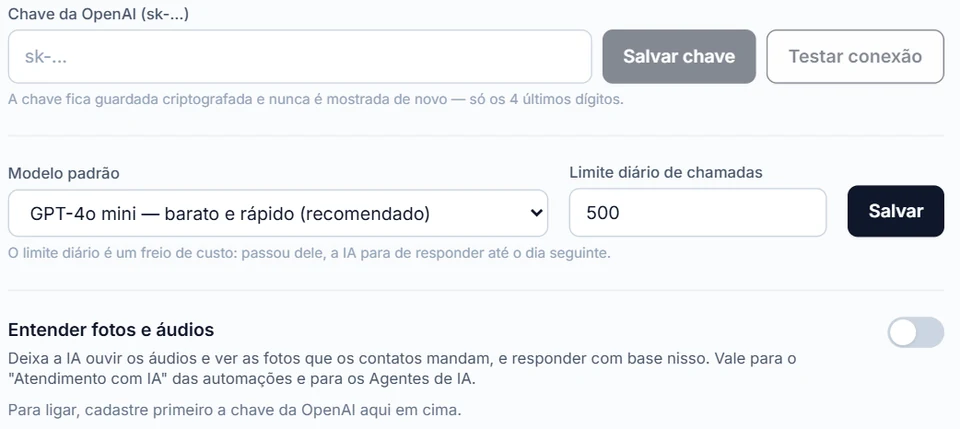
The AI agent uses one company’s key per account: OpenAI (ChatGPT) or Anthropic (Claude). The key is stored encrypted and the screen shows only its last 4 digits; Test connection checks the key right away. The Daily call limit starts at 500 and works as a cost brake: past it, the AI stops answering until the next day.
Usage is billed by OpenAI or Anthropic, on your key; InvestCRM charges nothing extra for the AI. Audio transcription only works with an OpenAI key. How the agent answers.
Odonto Invest
Odonto Invest: the clinic’s calendar connected to the AI
Odonto Invest is a dental clinic system from the same company as InvestCRM. Once connected, it brings in patients in pages of 200, then only changes every 15 minutes, creates the "Recepção Odonto Invest" agent and lets the AI book, confirm and reschedule appointments on the clinic’s calendar.
- It requires the Business plan, the same feature as the API.
- One clinic connects to one account only.
- The card shows on health accounts, enabled by the InvestCRM team.
How to set up reminders and recalls with it: WhatsApp for dental clinics.
Spreadsheets
Spreadsheets: importing and exporting contacts
- Imports CSV (separated by semicolons, commas or tabs: the system figures it out) or XLSX. It recognizes columns such as nome, telefone, celular, whatsapp and var1 to var5, and you can map each column to a field.
- Before saving, a preview shows what will happen, and you can apply tags during the import.
- A row with a missing or invalid phone comes back with the reason; a blocklisted number is skipped; the same mobile number with and without the ninth digit does not become two contacts.
- There is an .xlsx template to download and a "fill in empty names only" mode that brings names over without creating contacts.
- The plan’s contact limit applies to the contacts the import creates.
- Export generates an .xlsx with name and phone, from the Start plan up, only for Editors, Administrators or the Owner, and the action is logged.
Who charges
Who charges for what in an integration
- Meta: each delivered message, by category. For a Brazilian number, marketing costs R$ 0.3217, utility R$ 0.0350 and service R$ 0.0350 per message, charged to the WhatsApp account’s card.
- OpenAI or Anthropic: AI usage, on your account’s key.
- InvestCRM: the plan subscription. API, webhooks and conversions come with Business and Enterprise, with no per-call charge.
The most common path: your system applies a tag through the API (say, pedido-pago) and an automation with the Tag assigned to the contact trigger sends the template. Three templates that often start this way, with the likely category:
Order confirmed, sent when your system applies the tag
Name at Meta: pedido_confirmado · Category: Utility
Why this category: It confirms a purchase the person made, with the order details, and suggests nothing new. That is the order management case Meta lists as utility.
Invoice available, coming from the billing system
Name at Meta: fatura_disponivel · Category: Utility
Why this category: A notice about the bill for a service the person has is an account alert, which Meta counts as utility. Any invitation to buy more would push the template out of that category.
Back in stock
Name at Meta: voltou_ao_estoque · Category: Marketing
Why this category: Even if the person saved the product, telling them it is back is meant to sell: Meta treats recommendations and retargeting as marketing.
Rules for each category: template categorization, in Meta’s documentation. More texts in Message templates.
One month of notices coming from your system
| What for | Billed × price per message | Cost for the month |
|---|---|---|
| Order confirmations and invoices, from your system · Utility | 1,500 × R$ 0.0350 | R$ 52.50 |
| Back-in-stock notices · Marketing | 400 × R$ 0.3217 | R$ 128.68 |
| Replies to people who wrote back after a notice · Service (support) | 200 × R$ 0.0350 (of 1,200 this month) | R$ 7.00 |
| Total | R$ 188.18 |
Estimated monthly total, paid straight to Meta: R$ 188.18. The first 1,000 service messages of each number, every month, are free. If the utility templates in this bill were classified as marketing, the same month would go from R$ 188.18 to R$ 618.23. The volumes are an example to show the math, not data from a customer.
Meta's BRL rate card for Brazilian numbers, effective Oct 1, 2026, checked on Oct 9, 2026. See the rate card at Meta · Run your own numbers in the calculator
Security
Security and Brazil’s data law in integrations
An integration moves personal data out of one system and into another. Brazil’s data protection law (LGPD) lists security among the principles of processing, with technical and administrative measures against unauthorized access (art. 6, VII), and says the processor handles data following the controller’s instructions (art. 39). WhatsApp’s policy says to use chat data only for that chat and never pass one customer’s chat to another. Source: Law 13,709/2018 · Source: WhatsApp Business policy
- API keys stored only as a hash, tied to one account and rate limited per minute.
- Webhooks only to public https addresses, signed with HMAC-SHA256 and time-stamped, so your system can reject stale notices.
- AI keys and webhook secrets stored encrypted and shown only once.
- Generating keys and touching integrations belongs to the Administrator and the Owner; exporting the base is for Editors and up.
- Activity logs, from Business up, show who did what.
What InvestCRM does not decide for you: which data your system may receive. Before connecting a webhook, check the legal basis and the contract with whoever will receive the data.
Plans
Integrations on each plan
The number, the inbox and spreadsheet import work on every plan, within the contact limit. Using your AI key to answer customers starts on Start. API, webhooks, Meta and Google conversions and Odonto Invest belong to Business and Enterprise, which also show the activity logs.
| Feature | Grátis | Start | Business | Enterprise |
|---|---|---|---|---|
| Price per month | R$ 0 | R$ 147 | R$ 297 | R$ 597 |
| API and webhooks | Not included | Not included | Included | Included |
| Meta and Google conversions | Not included | Not included | Included | Included |
| AI agents | 1, test chat only | 1 | 5 | Unlimited |
| Activity log | Not included | Not included | Included | Included |
| Contacts included | 100 | 1,000 | 5,000 | Unlimited |
| WhatsApp numbers | 1 | 1 | 1 | 1 |
Keep reading
To connect InvestCRM to what you already use
- Support automation on WhatsApp
- Official API broadcasts, step by step
- Meta and Google conversions
- AI customer service on WhatsApp
- CRM and sales pipeline
- Pricing and plans
- WhatsApp for dental clinics
- Coexistence: app and API on one number
- Official WhatsApp API guide
- How much the official WhatsApp API costs
- Meta cost calculator
- InvestCRM home page
Start free on InvestCRM
The Free plan has no time limit and needs no card. Connect your number through the Meta window and try the system.