From the Start plan
1. Only people who opted in: a tag on import, then a segment
Starts when
Before the first broadcast, when you import the customer spreadsheet.
How to set it up
- Keep in the spreadsheet only the people who agreed to get WhatsApp messages from your business, then import it under Contacts with a tag such as "Autorizou WhatsApp" (opted in). The tag goes on every imported contact, and numbers already on the block list are skipped. Spreadsheet columns var1 to var5 become the contact's fields 1 to 5.
- Do not treat the Inscrito (subscribed) condition as proof of consent: a new contact that comes in through an import is already marked as subscribed, dated the day of the import. What separates the people who opted in is the tag you chose.
- Under Segments, build the audience: O contato casa quando (a contact matches when) ALL conditions hold, for example Tag has "Autorizou WhatsApp" and Field 2 (renamed "Last purchase") contains "2025". The Prévia (preview) shows how many match. A segment with no condition includes nobody.
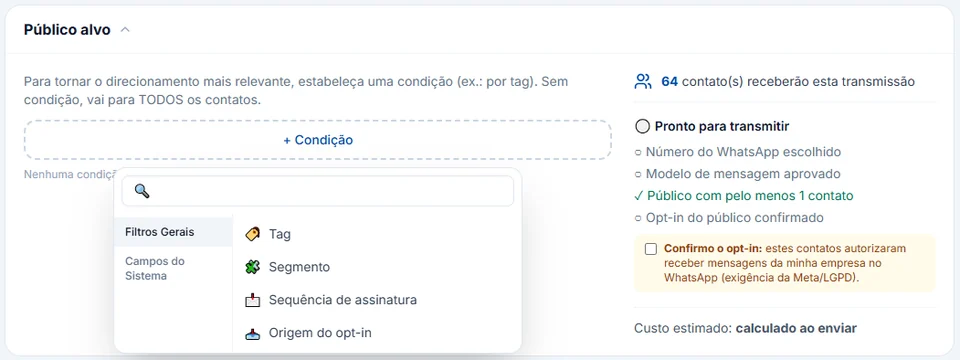
- In the broadcast, under Público alvo (audience), pick Segmento and, with + Excluir público (exclude audience), drop the tags of people who should not get it right now, such as an open exchange or a recent complaint.
What happens next
The broadcast only reaches people who passed the filters, and the system still asks for Confirmo o opt-in (I confirm opt-in) before publishing. InvestCRM does not work out on its own how long ago each customer bought: that information comes in through the spreadsheet, a field or the API.