
Skip to content

For businesses advertising on Meta

Click-to-WhatsApp ads: reply in time, qualify the lead and tell Meta who was worth it

The step-by-step for businesses paying for Facebook and Instagram ads that drop people into a chat: the first reply that opens Meta’s no-charge window, the ad origin on the agent’s screen, the pipeline stage that tells Meta about a good lead, and the brake that stops the ad from bringing people who never buy. The conversions part starts on the Business plan.

The problem

Where WhatsApp ad money leaks

A click-to-WhatsApp ad takes people straight into a chat with your business. From then on, almost everything happens inside WhatsApp, where Ads Manager cannot see: who replied, who fit your profile, who closed. Without that feedback, the ad keeps finding people who look like those who only started a chat.

  • The first reply has a deadline: Meta only opens the ad’s no-charge window if the business replies within the 24 hours after the message. A reply sent the next morning may be too late.
  • The lead arrives without context: the agent does not know which ad the person came from or which greeting they saw before writing, so they ask everything again.
  • The ad learns from the wrong signal: with no word on who became a good lead, the campaign treats the browser and the buyer the same.
  • Excluding the wrong people has rules: removing people who are clearly not a fit helps, but Meta’s custom audience terms do not accept lists built on financial information.

The setups below follow the path in order: the reply that goes out right away, the signal to Meta, the brake for browsers and the permission to write again later.

Setups in InvestCRM

Four setups, from the click to the qualified lead

Names in bold are the screen labels (the app shows them in Portuguese). The ad itself is created in Meta Ads Manager; InvestCRM comes in when the person writes. The measurement mechanism, including the Google side, is in Meta and Google conversions.

From the Start plan

1. A reply of its own for people who arrive from the ad

Starts when

In Automations, the trigger O contato vem de um anúncio e escreve (the contact comes from an ad and writes).

How to set it up

  1. Create the automation with that trigger. In ID do anúncio (opcional) (ad ID, optional), leave it empty to cover any ad, or paste one ad’s ID to give it a conversation of its own.
  2. Open with an Enviar Mensagem (send message) block with 2 or 3 buttons that sort out intent ("I want a price", "I have a question", "I’m already a customer"), or connect the Atendimento com IA (AI service) block directly.
  3. On each button, an Ações (actions) block with Adicionar Tag (add tag, using the campaign name) and Adicionar ao funil (add to pipeline), at the first stage.
  4. Publish before turning the ad on. The automation only starts when the person actually sends the first message: the click alone triggers nothing, because Meta does not report clicks.

What happens next

The reply goes out as soon as the message arrives, inside the 24 hours Meta requires to open the no-charge window, even if the first message is a voice note. In the inbox, the conversation shows Veio do anúncio (came from the ad) with the ad’s headline and text, the Saudação que a pessoa viu no anúncio (greeting the person saw in the ad) and a Ver o anúncio (see the ad) link. In the pipeline, the Tag do contato (contact tag) filter splits leads by campaign.
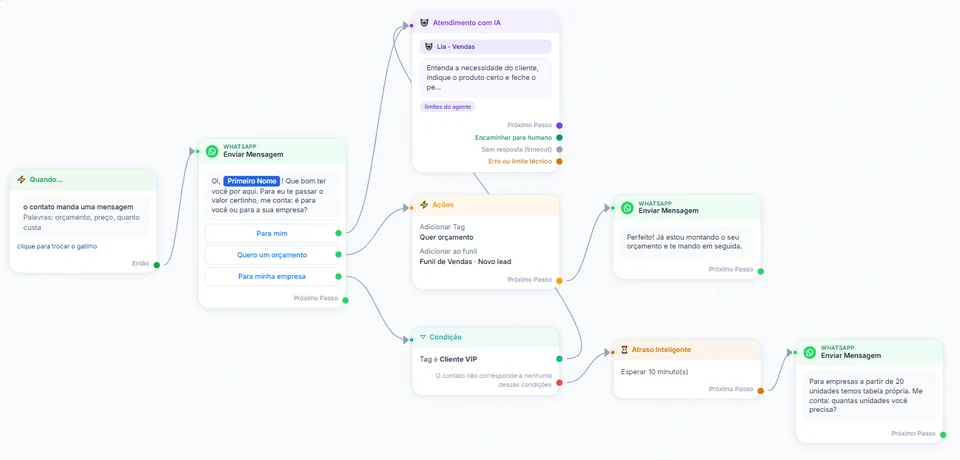
InvestCRM screen: sample flow builder where the welcome message has three buttons; one leads to Atendimento com IA and another to actions that add the tag Quer orçamento and put the contact in the sales pipeline at the Novo lead stage
Real InvestCRM screen, with sample data.

From the Business plan

2. Telling Meta who became a qualified lead

Starts when

Under Settings → Conversões da Meta (Meta conversions), you click Conectar (connect).

How to set it up

  1. Connect via Conecte-se através do WhatsApp (connect through WhatsApp, shown when the account has a connected number) or Usando o conjunto de dados e token (using dataset and token). The system creates your account’s dataset at Meta or reuses the existing one.
  2. In the Funil (pipeline), edit the stages and, on the Meta: line of the stage that means a good conversation (for example "Quote sent"), choose Lead qualificado (qualified lead). Each pipeline has only one stage with that mark.
  3. Pick a stage the lead reaches within the first week: an ad click older than 7 days is not sent, and the screen shows why.
  4. The signal goes out when someone on the team moves the card: dragging it in the pipeline or changing the stage on the contact record, under Contatos. An automation’s Adicionar ao funil action, even when it points to that stage, does not notify Meta.

What happens next

Meta receives a QualifiedLead event through the Conversions API, with that person’s most recent click, once per deal, however many times the card moves back and forth. Under Conferência dos envios (delivery check) you see the groups Avisados à Meta (sent to Meta), Na fila (queued), Não enviados (not sent) and Com erro (failed). A contact who came through a link or QR code has no ad click and creates no event, which is normal.

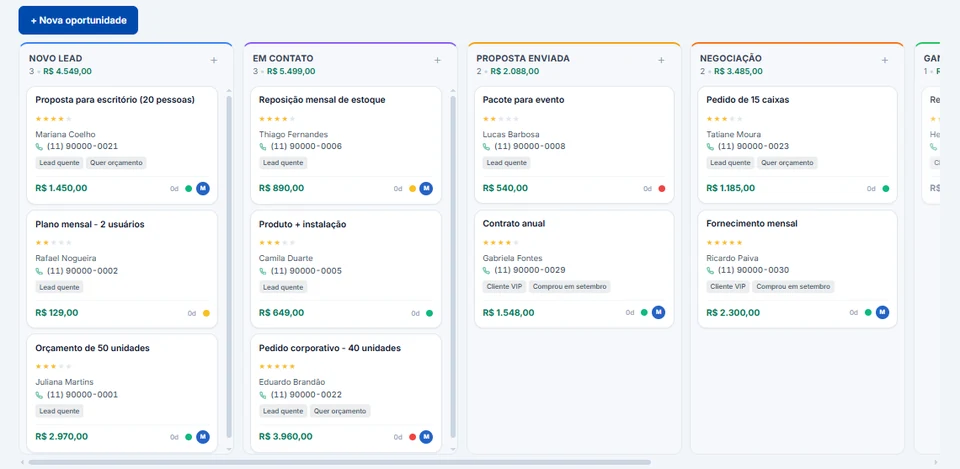
InvestCRM screen: sample sales pipeline with the Novo lead, Em contato, Proposta enviada and Negociação columns, each stage total, and cards showing value, phone number and tags, ready for the team to drag
Real InvestCRM screen, with sample data.

From the Business plan

3. The brake: removing people who are not a fit from the ad

Starts when

A pipeline stage marked Lead desqualificado (disqualified lead) on the Meta: line.

How to set it up

  1. Mark as Lead desqualificado the stage where poor-fit contacts go: outside your service area, wrong number, no interest. When someone on the team moves the card there, Meta gets no more signals about that contact, and anything still queued is cancelled. As with the qualified-lead signal, the lock only applies to that move: an automation that puts the contact in this stage (the Adicionar ao funil action or a human handoff set to a pipeline stage) locks nothing.
  2. Under Settings → Conversões da Meta, in the Público de leads desqualificados (disqualified leads audience) block, click Baixar lista (CSV) (download list). The file carries the phone number only: no name and no email.
  3. In Ads Manager, create the audience under Audiences → Create audience → Custom audience → Customer list, upload the file with a neutral name and exclude that audience in the WhatsApp ad set.
  4. Download again and update the same audience every month. The screen reminds you that Meta recommends at least 1,000 people on the list.

What happens next

The list is rebuilt on every download from whoever is in the stage today: people who left it drop off the list. The screen asks you not to upload the list when the reason for discarding is financial (credit denied, income, debt, credit score) and not to put financial words in the audience name, which matches Meta’s custom audience terms.

From the Start plan

4. Permission to write again after the no-charge window

Starts when

In the conversation that started from the ad, before it goes cold.

How to set it up

  1. In the same flow as the first setup, add a message with two buttons: "Send me news" and "Just this conversation".
  2. On the first button, Ações with Adicionar Tag "Accepted news". On the second, nothing: the person is still served, they just stay out of broadcasts.
  3. In later broadcasts, use the Tag "Accepted news" condition under Público alvo (target audience) and tick Confirmo o opt-in (I confirm opt-in), which the system asks for before publishing.

What happens next

Someone who clicked the ad and chatted does not become a marketing contact without asking for it. People who accepted join your broadcasts, and anyone who types just SAIR, PARAR, STOP, CANCELAR or DESCADASTRAR goes to the block list and is left out of future ones.

Message templates

Templates for after the first conversation

The first reply to someone who came from the ad is free text: they wrote and the window is open. Templates come in once the chat has gone cold: the answer to a request the person made, and news for people who agreed to get it. While the ad’s no-charge window is open, none of them is billed; once it closes, each delivery pays its category price. All three have a single variable, the name, because in the inbox every template variable gets the contact’s name. To include a date or another detail, send it from a flow’s Modelo aprovado (approved template) block and map {{2}} to a field (Campo 1 to 5) under Variáveis do modelo (template variables).

  • The call the lead asked for in the chat

    Utility

    Template name: ligacao_pedida

    Hi {{1}}, in our WhatsApp chat you asked [Company] to call you. An advisor will call this number during [days and business hours]. If you would rather keep going by message, tap Message me instead.

    • Call me
    • Message me instead

    Why this category

    It answers a request the person made (the phone call) and sells nothing: that is the request follow-up Meta files under utility. The bracketed text becomes fixed wording before you submit it; the exact time, if needed, the team agrees once the person taps a button and the window opens.

  • The quote that stopped halfway

    Utility

    Template name: cotacao_incompleta

    Hi {{1}}, the [product] quote you started with us on WhatsApp is missing one detail: [the missing detail, such as the delivery ZIP code]. When you can, send it in this chat and the team will finish the calculation.

    • I will send it

    Why this category

    It picks up a request the person opened and only says what is missing to finish it, with no special price, closing deadline or other product suggestion. Add "terms valid until Friday" and it stops being a follow-up: Meta moves it to marketing.

  • News for people who said yes in the ad chat

    Marketing

    Template name: novidade_da_campanha

    Hi {{1}}! When you chatted with [Company] from our [product] ad, you asked to hear what is new. [The news, such as the new collection] has arrived. Tap Show me for the details. If you no longer want these updates, reply STOP.

    • Show me

    Why this category

    It promotes a product to people who picked "Send me news" in the fourth setup: having asked for news does not turn promotion into utility. So it goes as marketing, only to the "Accepted news" tag, and ends with STOP, which InvestCRM reads as an opt-out.

What it costs

A month of WhatsApp ads on Meta’s rate card

Example of a business with one number that advertises every month. Messages sent inside the ad’s no-charge window are not listed here, because Meta bills none of them: the bill only shows what goes out after the no-charge window closes or in conversations that did not come from an ad. InvestCRM does not charge per message; Meta bills the payment method on your account.

Sample bill using Meta's official rate card, Brazilian number
What forCategoryMessages a monthBilledPrice per messageCost for the month
Campaign news for people who said yes, after the ad windowMarketing300300R$ 0.3217R$ 96.51
Call notices and half-finished quotes, outside the no-charge windowUtility120120R$ 0.0350R$ 4.20
Replies in open conversations with contacts who did not come from an adService (support)1,600600R$ 0.0350R$ 21.00
Estimated monthly total, paid straight to MetaR$ 121.71

The first 1,000 service messages of each number, every month, are free.

If the utility templates in this bill were classified as marketing, the same month would go from R$ 121.71 to R$ 156.11.

The cheapest way to handle an ad lead is to reply fast and wrap things up while the no-charge window, which can last up to 7 days, is open. InvestCRM does not mark on screen which messages fell inside that window: Meta’s invoice is where you check.

The volumes are an example to show the math, not data from a customer.

Meta's BRL rate card for Brazilian numbers, effective Oct 1, 2026, checked on Oct 9, 2026. See the rate card at Meta

Run your own numbers in the calculator →

Rules

What Meta and the LGPD expect from businesses advertising to WhatsApp

A summary of the rules that matter from the ad to the event sent back, with links to the official text. InvestCRM organizes the conversations and sends the signals you set up; the ad and the audience list are yours.

  • The ad’s no-charge window depends on your first reply

    When someone writes through a click-to-WhatsApp ad using the app on Android or iPhone, the customer service window opens. If the business replies inside it, that reply is not billed and opens the free entry point window, which can stay open for up to 7 days: during it, marketing, utility, authentication and service messages are not billed. People writing from WhatsApp on desktop or web do not open that window.

    In InvestCRM

    The O contato vem de um anúncio e escreve trigger replies as soon as the message arrives. The InvestCRM AI counts as a service message, which the no-charge window covers; the only thing still billed inside it is the Meta Business Agent, Meta’s own agent.

    Source: Meta pricing: free entry point window

  • Chatting is not permission for marketing later

    The WhatsApp Business Messaging Policy only allows contacting people who gave you their number and an opt-in confirming they want to receive later messages. The best practices ask for opt-in by category (orders, offers, news) and a clear way to leave, and every opt-out request must be honored.

    In InvestCRM

    The system asks you to confirm opt-in before publishing a broadcast, and anyone who types just an opt-out word goes to the block list. Recording the consent itself is up to you: keep it in a tag, as in the fourth setup.

    Source: WhatsApp Business Messaging Policy

  • The event needs the click, and there is no bad-lead signal

    In the Conversions API for Business Messaging, the ctwa_clid, the click identifier Meta sends in a conversation that came from a click-to-WhatsApp ad, is a required field. The list of accepted events covers purchases, leads, qualified leads, orders and reviews: there is no "bad lead" or disqualified-lead event.

    In InvestCRM

    InvestCRM stores every click and sends only the QualifiedLead, never the sale: the sale goes only to Google, if you use Google conversions. For bad leads, the Lead desqualificado mark does the only thing possible, which is to stop reporting that person.

    Source: Conversions API for Business Messaging

  • Customer lists with no sensitive data in the criteria

    Under Meta’s Custom Audiences Terms, whoever uploads the list states they have the rights and a legal basis to share the data (item 1), the audience name and criteria cannot reflect sensitive information, including health or financial information (item 2), and anyone who withdraws permission must be removed from the audience (item 4).

    In InvestCRM

    The disqualified-leads list carries the phone number only, is rebuilt from whoever is in the stage today and comes with the warning not to use financial reasons or financial words in the name. You are the one who sends the list to Meta, in Ads Manager.

    Source: Meta Custom Audiences Terms

  • A legal basis for sending data back to the ad

    Under Brazil’s LGPD, all processing needs one of the grounds in article 7, such as consent or legitimate interest. When the basis is legitimate interest, only strictly necessary data may be processed and the controller must ensure transparency (article 10, §§ 1 and 2).

    In InvestCRM

    The qualified-lead event carries the click identifier, not the name or the conversation. State in your privacy policy that you measure ads with Meta; InvestCRM does not write that text for you.

    Source: Brazil’s General Data Protection Law (Law 13,709/2018)

Rules checked against the official sources on Oct 18, 2026. This is not legal advice: when in doubt, ask your professional council.

Plan

Which plan for advertisers

To measure the ad, the plan is Business: the connection to Meta’s Conversions API, the Lead qualificado and Lead desqualificado marks in the pipeline and the disqualified-leads list all start there, together with Google conversions. It also brings 5 pipelines (one per advertised product, if you like), 5,000 contacts included and 10 active automations.

Only want to reply fast and split leads by campaign, without sending anything back to Meta? Start covers the first and fourth setups: the ad trigger, tags, the pipeline and broadcasts to people who accepted, with 2 active automations and 1 pipeline.

Contacts who arrive from the ad count toward the plan’s contact allowance. What each plan includes is in the table.

InvestCRM plans: price, limits and features of each one
FeatureGrátisStartBusinessEnterprise
Price per monthR$ 0R$ 147R$ 297R$ 597
Yearly (35% off)R$ 0R$ 1,146.60 a year (same as R$ 95.55 a month)R$ 2,316.60 a year (same as R$ 193.05 a month)R$ 4,656.60 a year (same as R$ 388.05 a month)
Meta and Google conversionsNot includedNot includedIncludedIncluded
Sales pipelinesNot included15Unlimited
Active automationsNot included21050
Contacts included1001,0005,000Unlimited
AI agents1, test chat only15Unlimited

See all plans and pricing →

Questions

Questions from people paying for the click

Does InvestCRM create or manage my ad?

No. The ad is created and paid for in Meta Ads Manager. InvestCRM receives the conversation, shows which ad it came from, organizes the service and, on Business, tells Meta who became a qualified lead.

Does Meta find out about the sale?

Not through InvestCRM: it sends Meta only the qualified lead. The closed sale goes to Google Ads if you use Google conversions, which are for Google ads with a WhatsApp button on your site. Both paths are in Meta and Google conversions.

Why does an ad lead not show as sent to Meta?

The usual reasons: the person came through a link or QR code and has no ad click; the click is more than 7 days old; the contact has already been through a disqualified-lead stage; or an automation placed the card in the stage instead of someone on the team moving it. In the Conferência dos envios, only a click older than 7 days becomes a Não enviados row with the reason; the other cases create no row at all. Check in the inbox whether the conversation shows Veio do anúncio, and look at how the card got to the stage.

Do people who click the ad on a computer also open the no-charge window?

No. Under Meta’s rule, the free entry point window only opens for people writing from the WhatsApp app on Android or iPhone; WhatsApp for desktop and the web version do not count. The conversation works as usual, but messages are billed normally.

Can I keep the same number on my phone while the ad runs?

Yes, with Coexistence: the number stays in the WhatsApp Business app and on the API. Ad conversations reach InvestCRM with the ad origin, and the team replies from wherever is most practical.

Keep reading

To set up the path from the ad

Start free on InvestCRM

The Free plan has no time limit and needs no card. Connect your number through the Meta window and try the system.