Skip to content

For gyms and fitness studios

WhatsApp for gyms and fitness studios: trial classes, monthly fees and win-backs

For gyms, boxes and pilates, dance and martial arts studios that work on Meta's official API: the trial class that starts from a QR code or an ad, the billing notice that counts as utility and the renewal invitation that counts as marketing, bringing former members back without straining your number, and an agent that answers the class schedule without writing workouts.

The problem

Lots of after-hours questions, a small team and renewals in the middle

At a gym, the front desk WhatsApp mixes three kinds of chat: someone who saw an ad and wants to know how the trial class works, a member asking whether the 7 a.m. class runs tomorrow, and a former member who vanished four months ago. It all lands on one phone that sits on the counter and changes hands between shifts.

  • The peak is outside front desk hours: questions arrive at 6 a.m., before the desk opens, or at 10 p.m., after it closes, and the prospect signs up with whichever studio answered first.
  • Billing and renewal look like the same message, but they are not: for Meta, saying the monthly fee will be charged to the card is utility; asking someone to renew is marketing, which costs much more per delivery.
  • Messaging every former member on the same day weighs on your number: people who no longer want messages block or report, and Meta may limit sending for businesses that get a lot of negative feedback.
  • Minors and health data: martial arts, dance and swimming classes include children and teenagers, and medical certificates and fitness assessments arrive over WhatsApp. Both cases have their own rules under Brazil's LGPD.

Below are four setups with what InvestCRM does today, the plan each one needs and what stays with the gym.

Setups in InvestCRM

From the trial class to coming back to train

Labels in bold are the on-screen ones (in Portuguese). The pipeline, tasks and inbox used here are explained in WhatsApp CRM.

From the Start plan

1. Trial class from the front desk QR code and from ads

Starts when

Someone scans the QR code on the poster and sends the prewritten phrase, or taps a click-to-WhatsApp ad and writes.

How to set it up

  1. In the site's WhatsApp link and QR code generator, build a link to the gym's number with the ready-made message "I want a trial class" and print the QR code on the front desk poster.
  2. In Automations, create a flow with the O contato envia uma mensagem (contact sends a message) trigger: under Palavras que ligam o fluxo (trigger words), enter "trial class" and, under Como comparar (how to compare), keep A mensagem contém a palavra (message contains the word). That catches the QR code phrase and anyone who types it their own way; Ignorar acentos e maiúsculas (ignore accents and case) is on by default.
  3. For ads, create another automation with the O contato vem de um anúncio e escreve (comes from an ad) trigger and send it down the same path with the Iniciar a automação (start automation) block. A click alone fires nothing: Meta only notifies when the person sends their first message. Without that second automation, someone who comes from the ad and writes something else lands on the Resposta padrão (default reply, setup 4).
  4. Add a Pergunta (question) block of the Escolha entre opções (multiple choice) type (Weights, Functional, Pilates…) saving the answer to Field 1, and another for the preferred day and time, saved to Field 2. On this page, Field 2 is used for nothing else.
  5. Finish with Ações (actions): Adicionar Tag (add tag) "Trial class" and Adicionar ao funil (add to pipeline) at the "Class booked" stage of a pipeline with Class booked, Showed up, Joined and Lost.
  6. The time confirmation goes out as a regular message, because the person just wrote and the 24-hour window is open. If the front desk only replies after the window has closed, it opens the chat and uses Enviar modelo de mensagens (send template) with aula_experimental_horario, which asks the person to reply: their reply reopens the window and the time goes out as a regular message.

What happens next

Anyone writing at 10 p.m. leaves with a class requested, and the front desk opens the pipeline in the morning knowing each person's modality and time. No-shows move to Lost with a ready-made reason such as Não é o momento (not the right time), and the Showed up stage tells you how many actually tried it.
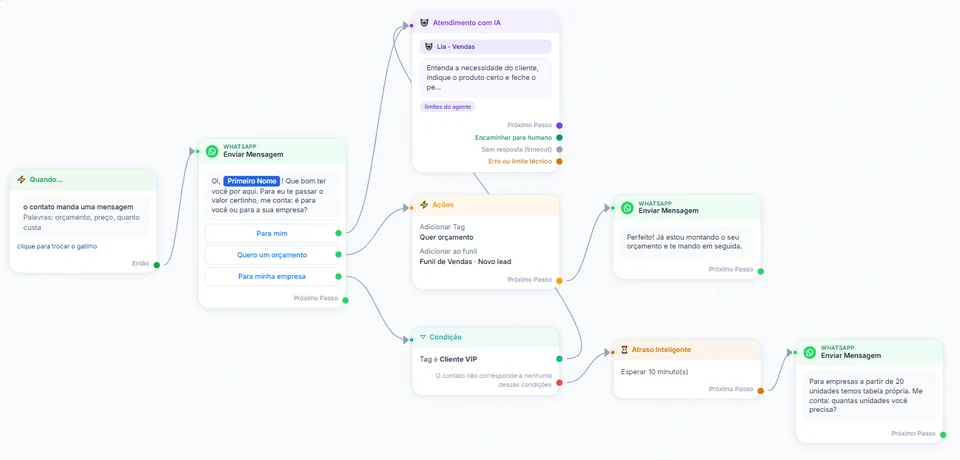
InvestCRM screen: automation builder with a keyword trigger, a message with three buttons and, wired to them, the Atendimento com IA block, an Ações block with Adicionar Tag and Adicionar ao funil, a tag-based Condição and a 10-minute Atraso Inteligente delay
Real InvestCRM screen, with sample data.

From the Start plan

2. Monthly fee notice as utility, renewal invitation as marketing

Starts when

A member gets the "Fee due" tag (Tag atribuída ao contato, tag added, trigger), applied by the front desk or by the gym's management system.

How to set it up

  1. Import the member spreadsheet (CSV or XLSX) with the next billing date in Field 3, and label members in the last month of a fixed-term plan (quarterly, six-month, annual) as "Plan ending"; for them, Field 3 is the date the plan ends.
  2. Submit the mensalidade_a_vencer (Utility) and renovar_plano (Marketing) templates from the templates section.
  3. Create the flow with the tag added trigger set to "Fee due" and, right after it, a Condição (condition) block that checks Uma tag do contato (a contact tag): "Plan ending". The block has two exits, Yes and No.
  4. On the No exit, a Modelo aprovado (approved template) block with the fee notice, which works for card, PIX or boleto payers; on Yes, another with the renewal invitation. In both, {{1}} = First Name and {{2}} = Field 3. End each path with Remover Tag (remove tag) "Fee due".
  5. Once a week, on the Contacts screen, select members due in the coming days and apply the tag in one go. On Business, the gym's system can do it through the API, up to 60 calls a minute per key; the label is what fires the automation, because writing only the field through the API triggers nothing.

What happens next

A member who only has this month's fee gets a notice with no offer, which Meta bills as utility, whether they pay by card, PIX or boleto. The renewal invitation, which is marketing, goes only to members whose plan is ending, with a way to opt out. The tag comes off at the end of each path, ready for next month.

From the Business plan

3. Win back former members in batches

Starts when

A broadcast to everyone labeled "Former member", split into batches, one per day.

How to set it up

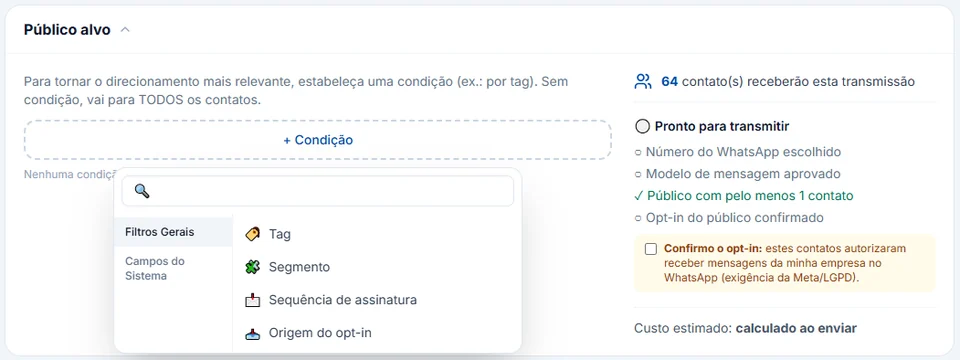
  1. In Transmissões (broadcasts), pick the volta_aos_treinos (Marketing) template. Under Público alvo (audience), the Tag condition is "Former member"; with + Excluir público (exclude audience), leave out "Minor" and anyone who told the front desk they want no promotions.
  2. Tick Confirmo o opt-in (I confirm opt-in), which the system asks for before publishing. If the broadcast goes past 100 messages on a single day, the Mais de 100 disparos por dia (more than 100 a day) warning appears: reports can get the number blocked even on the official API.
  3. To spread sending out, use Envio Avançado (advanced sending): split the audience into 2 to 30 batches and schedule each on its own day. Each batch becomes its own broadcast in the list, with its own metrics.
  4. In the broadcast flow, wire the "I want to come back" button to Ações with Adicionar ao funil at the "Win-back" stage, and to an Encaminhar para atendimento humano (hand off to a human) block so the front desk can talk.

What happens next

Each batch report shows sent, delivered, read, replies, failures and clicks per button. Anyone who types STOP (or SAIR, PARAR) goes to the block list; anyone who tells the front desk they want no more messages can get the descadastro label, which puts the number on the same list. Start has no batches and a quota of 1,000 broadcast messages a month: an audience larger than the balance is refused in full.

InvestCRM screen: the broadcast Público alvo panel with the + Condição menu open on Filtros Gerais (Tag, Segmento, Sequência de assinatura, Origem do opt-in), a count of 64 contacts who will receive it, the Ready to broadcast checklist and the Confirmo o opt-in box
Real InvestCRM screen, with sample data.

From the Start plan

4. An agent that answers the class schedule without writing workouts

Starts when

A member or prospect asks about class times, plan terms or whether they can train while in pain, and the AI agent wired to the default reply is the one answering.

How to set it up

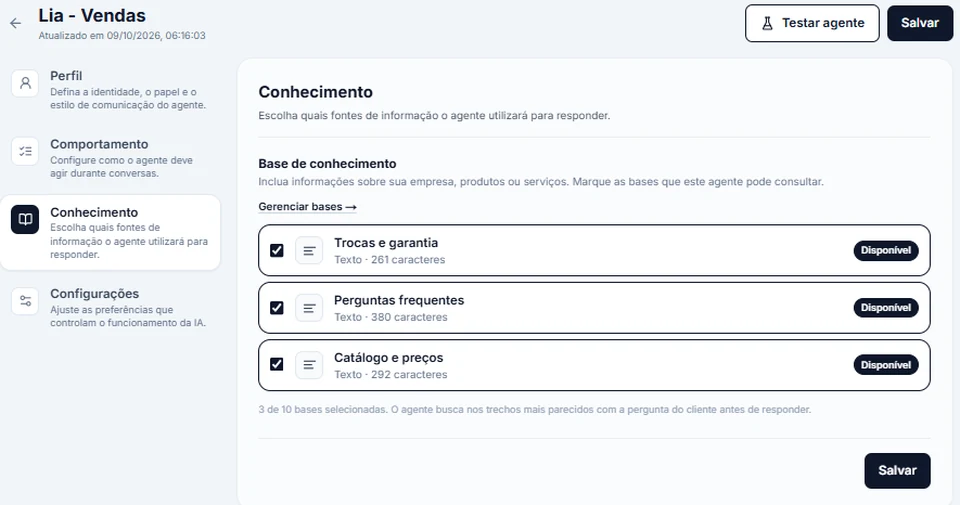
  1. Create a knowledge base with the class schedule, the plans with their minimum terms and cancellation rules, and what to bring to the first class, then tick that base on the agent's Conhecimento (knowledge) tab.
  2. Under Outras regras ou restrições (other rules, up to 8,000 characters), write that the agent never writes workouts, never recommends supplements or diets and never comments on pain or injuries: in those cases, the chat goes to an instructor.
  3. In Automations → Básicas, use Configurar com IA (set up with AI) on the Resposta padrão (default reply), which kicks in when no keyword matched the message. If the gym wants the AI only after hours, turn on Responder só fora do horário de atendimento (mensagem de ausência) (reply only outside business hours) and fill in the hours.
  4. Under Iniciadores de conversa (conversation starters), add up to 4 shortcuts with no emoji, such as "Class times" and "I want a trial class", each one opening the right automation.

What happens next

The 10 p.m. question gets an answer, and requests for workouts or advice about pain stay with people trained for that. On Business, the Transferir para setor/pessoa (transfer) skill puts the chat in the "Instructors" department; on Start, the agent tells people when the team replies.

InvestCRM screen: the Conhecimento tab of the AI agent editor, listing the sources it checks before replying, three bases ticked and marked Disponível, the Gerenciar bases link and the Testar agente button at the top
Real InvestCRM screen, with sample data.

Message templates

Five templates for the gym routine

To message a member first, outside the 24-hour window, you need a Meta-approved template. A billing notice and a renewal invitation land in different categories, even with the same kind of date in the text: compare the second and the third.

  • Trial class time

    Utility

    Template name: aula_experimental_horario

    Hi {{1}}. We got your trial class request and the front desk has set a time aside for you. Reply to this message so we can confirm the day and time.

    • I want to confirm
    • Another day works

    Why this category

    It answers a request from the person and does not try to sell a plan. Add "sign up today" and it becomes marketing: Meta treats mixed content as marketing. It has a single variable because it goes out through the chat's send-template option, which fills every variable with the name; the reply reopens the window and the time goes out as a regular message.

  • Fee coming due

    Utility

    Template name: mensalidade_a_vencer

    Hi {{1}}. Your next membership fee is due on {{2}}. If it is charged to the card on file, there is nothing to do; to get the PIX code or the boleto, or to ask about the charge, reply to this message.

    Why this category

    Meta lists, as utility account alerts, a reminder that a monthly payment will be billed to the saved card and a notice to top up an account by a date. This one only states the charge, with no offer and no renewal pitch, so it works for every member with a monthly fee.

  • Renewal invitation

    Marketing

    Template name: renovar_plano

    Hi {{1}}! Your plan ends on {{2}}. Want to keep training with us? The front desk will show you the renewal options, with the minimum term and the cancellation rules in writing. To stop receiving notices like this, reply STOP.

    • I want to renew

    Why this category

    Meta's category rules say utility messages must not attempt to secure renewals, and they give an expiring subscription with "renew today" as a marketing example. That makes this one marketing; it goes only to members labeled "Plan ending" and points to the full terms.

  • Come back to train

    Marketing

    Template name: volta_aos_treinos

    Hi {{1}}! We miss you at [Gym]. If you would like to come back, the team will set up a schedule with you and walk you through the current plans. To stop receiving messages like this, reply STOP.

    • I want to come back

    Why this category

    Messaging a former member is marketing by definition: there is no ongoing service. The text promises no weight loss or results, so it misleads no one (Brazil's Consumer Protection Code, art. 37), and it says how to opt out.

  • Class cancelled

    Utility

    Template name: aula_cancelada

    Hi {{1}}. Your class group's session today has been cancelled. All other classes run on their usual schedule; if you would like to switch classes, reply to this message.

    Why this category

    It updates a service the member already pays for, with nothing to buy attached: the same reasoning Meta applies to notices about changes to or cancellation of an order. It goes out as a broadcast to the class label, with {{1}} = First name.

What it costs

A month of messages for a gym, on Meta's rate card

Example for a gym with one number: billing notices, class confirmations and cancellations as utility, renewals and former-member win-backs as marketing, and everyday chats inside the 24-hour window as service. Meta charges per delivered message, to the payment method on its own account; InvestCRM charges nothing per message.

Sample bill using Meta's official rate card, Brazilian number
What forCategoryMessages a monthBilledPrice per messageCost for the month
Renewal invitations and win-backsMarketing900900R$ 0.3217R$ 289.53
Fee notices, confirmations and cancelled classesUtility700700R$ 0.0350R$ 24.50
Chats with prospects and members, from the desk and the agentService (support)2,5001,500R$ 0.0350R$ 52.50
Estimated monthly total, paid straight to MetaR$ 366.53

The first 1,000 service messages of each number, every month, are free.

If the utility templates in this bill were classified as marketing, the same month would go from R$ 366.53 to R$ 567.22.

What lowers this bill most without touching volume is the category: the fee notice, with no offer, goes out as utility to every member, and the renewal invitation goes only to members whose plan is ending. For your own volume, use the calculator.

The volumes are an example to show the math, not data from a customer.

Meta's BRL rate card for Brazilian numbers, effective Oct 1, 2026, checked on Oct 9, 2026. See the rate card at Meta

Run your own numbers in the calculator →

Industry rules

What Meta, the CDC and the LGPD ask for, and what the system does

For Brazilian gyms and studios, the weight sits with Meta's rules, the Consumer Protection Code (CDC) and the LGPD. Each item links to the official text. InvestCRM sends and organizes; the wording, the audience and the contract belong to the gym.

  • Billing is utility; renewal is marketing

    In Meta's category rules, a reminder that a monthly service payment will be billed to the saved card is an example of utility. A notice that a subscription is about to expire with "renew today" is marketing: utility messages must not promote, include offers or attempt to secure renewals. A survey is only utility when it is about a specific interaction; a generic one is not approved as utility.

    In InvestCRM

    The Condição block splits the two audiences in a single flow, using the "Plan ending" label. If Meta moves one of your utility templates to marketing, the Meus Modelos table, under Settings → WhatsApp, shows the new category with a change notice.

    Source: Meta template categorization

  • Opt-in, stop requests and negative feedback

    The WhatsApp Business Messaging Policy only allows contacting people who gave their number and agreed to receive messages, and it requires honoring every request to stop, made inside or outside WhatsApp. It also warns that people can block or report businesses and that Meta's systems may limit how many messages a business sends based on that feedback.

    In InvestCRM

    Before publishing, the system asks for Confirmo o opt-in; above 100 messages in a day, it shows the warning and lets you go back; Business's Envio Avançado spreads the audience across batches. Anyone who types SAIR, PARAR, STOP, CANCELAR or DESCADASTRAR goes to the block list.

    Source: WhatsApp Business Messaging Policy

  • One consent for each kind of message

    In the same policy's best practices, Meta suggests asking for consent that covers the message categories the business will send, such as class notices and promotions, and explaining clearly how a person can refuse a specific category.

    In InvestCRM

    Store what each member agreed to in a label such as "Accepts promotions" and use it as the condition in the Público alvo of marketing broadcasts. The system does not ask on its own: the question can be a Pergunta block in the sign-up flow.

    Source: WhatsApp Business Policy best practices

  • Members under 18

    Brazil's LGPD requires processing data of children and teenagers in their best interest (art. 14), and processing a child's data only with specific, prominent consent from at least one parent or legal guardian (art. 14, § 1).

    In InvestCRM

    InvestCRM does not know anyone's age. Register the guardian's contact, label the member "Minor" when they have their own number, and leave that label out with + Excluir público on marketing broadcasts.

    Source: LGPD, art. 14 (Law 13,709/2018)

  • Medical certificates, fitness assessments and biometrics

    Health data and biometric data are sensitive personal data (LGPD, art. 5, II): a medical certificate, an intake questionnaire and the fingerprint used at the turnstile all fall into that category. Outside the exemptions in art. 11, processing depends on specific, prominent consent for specific purposes.

    In InvestCRM

    A file a member sends in the chat opens in the inbox only through a signed link, valid for 60 to 90 minutes. The AI only looks at photos if the account turns on Entender fotos e áudios, with consent on record.

    Source: LGPD, arts. 5 and 11 (Law 13,709/2018)

  • A clear offer and a cooling-off period

    Brazil's Consumer Protection Code requires correct, clear and precise information on price and features in any offer (art. 31) and calls advertising misleading by omission when it leaves out essential data (art. 37, § 3), such as minimum terms and cancellation fees. Art. 49 gives 7 days to withdraw when the contract is made outside the business premises, "especially by phone or at home".

    In InvestCRM

    InvestCRM does not review the offer wording. Put the terms in the template or in the agent's knowledge base and, if a membership is closed in the chat, record the date in a note on the pipeline deal. How art. 49 applies to sales by message is a question for your lawyer.

    Source: Consumer Protection Code (Law 8,078/1990)

  • Training belongs to the Physical Education professional

    Law 9,696/1998 gives Physical Education professionals the remit to coordinate, plan, program, supervise, assess and carry out programs and plans in physical activity and sport (art. 3).

    In InvestCRM

    The system has no idea what a workout is: the brake is the rule written under Outras regras ou restrições, plus the transfer to an instructor. Before going live, ask questions like "what workout should I do to lose weight?" in Testar agente (test agent).

    Source: Law 9,696/1998 (Physical Education profession)

  • Pilates taught by a physiotherapist follows COFFITO

    When a pilates class is taught by a physiotherapist, COFFITO Resolution 532/2021 applies: to publish a member's or a class's image, text or audio, the Free and Informed Consent Form (arts. 1 and 2) and, on the post, the professional's name, registration number and the date (art. 4).

    In InvestCRM

    InvestCRM does not know who teaches each class. If a physiotherapist runs the studio, also read the health rules on the clinics page and write the CREFITO number into the template itself.

    Source: COFFITO Resolution 532/2021

Rules checked against the official sources on Oct 18, 2026. This is not legal advice: when in doubt, ask your professional council.

Plan

Business for a gym; Start for a small studio

For a gym, the recommended plan is Business: members and former members add up fast, and it includes 5,000 contacts, broadcasts with no monthly message cap, batch sending, the API for the gym's system to apply labels and the support queue with departments. It fits you plus 3 people (front desk, coordination and sales, for example) and up to 10 active automations.

A studio with few members fits on Start, which runs 2 automations at a time. Pick the two that matter most, for example the trial class from the QR code phrase and the Resposta padrão (default reply) with the AI agent, which also picks up people coming from the ad. The fee notice and the ad's own automation need more slots, which Business has (10). Start comes with 1,000 contacts and 1,000 broadcast messages a month; batches, the API and the queue are left out.

With Coexistence, contacts that come only from the phone's address book do not count toward the plan's contacts. Meta messages are paid separately, straight to Meta.

InvestCRM plans: price, limits and features of each one
FeatureGrátisStartBusinessEnterprise
Price per monthR$ 0R$ 147R$ 297R$ 597
Yearly (35% off)R$ 0R$ 1,146.60 a year (same as R$ 95.55 a month)R$ 2,316.60 a year (same as R$ 193.05 a month)R$ 4,656.60 a year (same as R$ 388.05 a month)
Contacts included1001,0005,000Unlimited
People on the accountJust youYou plus 1You plus 3You plus 15
Broadcast messages per monthNot included1,000UnlimitedUnlimited
Batch sending (Envio Avançado)Not includedNot includedIncludedIncluded
Active automationsNot included21050
API and webhooksNot includedNot includedIncludedIncluded
Human handoff with queues and departmentsNot includedNot includedIncludedIncluded

See all plans and pricing →

Questions

Questions from whoever runs the gym front desk

Can the AI book the trial class in the schedule?

Only if it is connected to a system with an API, through the Consultar sistema externo (API) (external system) skill. Without it, the agent answers questions, collects the modality and preferred time and leaves the booking to the front desk. Memberships and contracts stay in the gym's system.

A member replied "stop texting me". Are they removed automatically?

Only if they type the word on its own: SAIR, PARAR, STOP, CANCELAR or DESCADASTRAR. Tapping a button does not opt anyone out. If they asked in other words, apply the descadastro label on the Contacts screen or use Mandar para a blacklist (send to block list) with several contacts selected; to undo it, use "remover" in the Blacklist window. More in broadcast best practices.

What does a chat that started from an ad cost?

If the person came from a click-to-WhatsApp ad on the phone app and the gym replies within 24 hours, Meta opens a free entry point window that can last up to 7 days and bills no messages inside it, templates included. Outside that window, the rate card in the calculator applies.

Can instructors use the system?

Yes, as team members, within the plan's headcount: on Start, you plus 1; on Business, you plus 3. At the Colaborador level, an instructor answers chats and works the pipeline without editing templates or broadcasts.

Keep reading

Setting up your gym in InvestCRM

Start free on InvestCRM

The Free plan has no time limit and needs no card. Connect your number through the Meta window and try the system.