From the Start plan
1. AI follow-up while the chat is still open
Starts when
The AI replied inside an Atendimento com IA (AI customer service) block and the lead sent nothing else.
How to set it up
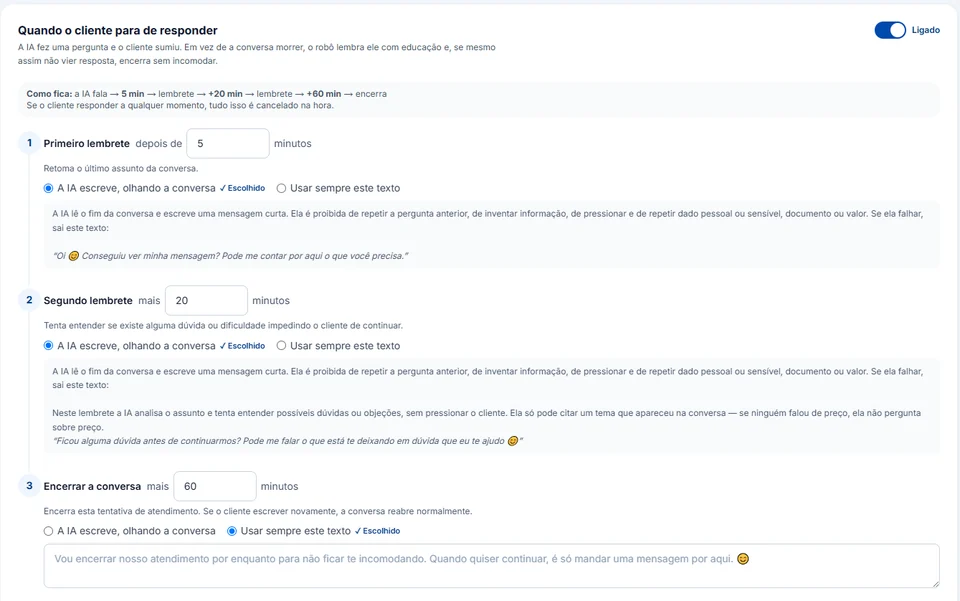
- In Settings → Agente de IA, open Quando o cliente para de responder (when the customer stops replying) and switch it on: it ships turned off on every new account.
- The factory timings are 5 minutes to the Primeiro lembrete (first follow-up), 20 more to the Segundo lembrete and 60 more to Encerrar a conversa (close the chat). Each step accepts up to 10,080 minutes (7 days), but add up all three and keep the total under 24 hours: a follow-up that comes due after the window closed is not sent, and the system does not swap the text for a template on its own.
- For each step, choose A IA escreve, olhando a conversa (the AI writes from the conversation) or Usar sempre este texto (always use this text). On the second follow-up the AI looks for the doubt that stalled the lead, but it may only mention topics that came up in the chat: if nobody talked about price, it will not ask about price.
- To stop earlier, set 0 minutes on the step from which you want nothing more: that step and the ones after it are dropped.
What happens next
If the lead replies at any point, whatever is left gets cancelled. It is also cancelled when the chat moves to someone on your team, or when the contact is on the "Contatos que a IA nunca atende" (contacts the AI never serves) list. If the chat ended resolved, with no question left open, no follow-up goes out, not even the fixed text. The last step closes the automated conversation; if the person writes later, the chat reopens as usual.