
Skip to content

Round-the-clock service with AI

Round-the-clock WhatsApp service: AI answers now, your team picks up during business hours

How to set up a WhatsApp in InvestCRM that replies at 2 a.m. without promising what nobody will deliver: the AI agent answers whoever writes at any hour, sends what needs a person to the right department queue, tells the customer when the team is really back, and gets Monday’s follow-up ready for when the 24-hour window has already closed.

The problem

What happens to the message that arrives after everyone has gone home

Many WhatsApp conversations start outside business hours: late at night, on Sunday, over a long holiday weekend. With nobody on the other side, the easy question waits until morning and the hard one waits even longer. Delay is not the only issue: the official API has timing and cost rules that change everything once the reply is late.

  • The window closes over the weekend: someone who writes on Friday at 8 p.m. and gets an answer on Monday at 9 a.m. went 61 hours without a reply. After 24 hours with no message from the customer, Meta only lets the business speak with an approved template.
  • A bot with no way out: the WhatsApp Business policy allows automation inside the 24-hour window, as long as there is a prompt, clear path to a person, such as an in-chat handoff, a phone number or an email address.
  • A promise that turns into a complaint: "we’ll get back to you right away" sent at 2 a.m. brings a complaint at 2:15. The notice has to say when the team is back, and "tomorrow" on the eve of a holiday is wrong.
  • Replying now has a price: since October 1, 2026, every reply inside the window is a service message. Meta gives each number 1,000 a month and charges from the 1,001st, and every bubble sent counts as one message.

Below are four setups that cover the whole night: who answers, where the things the AI cannot solve go, what the customer hears while waiting, and how the team picks up in the morning.

Setups in InvestCRM

Four setups for a WhatsApp that never sleeps

Names in bold are the screen labels (the app shows them in Portuguese). How the agent itself is built (profile, rules, knowledge base) is covered in AI customer service; here the focus is on what happens after hours.

From the Start plan

1. AI on the default reply, with a plan B for when it cannot answer

Starts when

In Automations → Básicas, on the Resposta padrão (default reply), you click Configurar com IA (set up with AI).

How to set it up

  1. Add your OpenAI or Anthropic key under Settings → Agente de IA (AI agent) and build the agent. In its rules, write what it must not handle alone (exchanges, refunds, complaints) and that it should introduce itself as a virtual assistant.
  2. Configurar com IA creates the default-reply bot with the trigger and the Atendimento com IA (AI service) block already wired to it, and opens the builder. Check which agent the block uses and click Publicar (publish).
  3. In the builder, connect the block’s Erro ou limite técnico (error or technical limit) output to an Enviar Mensagem (send message) block with fixed text, for example: "Our assistant is unavailable right now. Leave your message and the team will reply during the next business hours."
  4. Back in Automations → Básicas, under Responder o mesmo contato de novo (reply to the same contact again), switch the factory value Só depois de 24 horas (only after 24 hours) to Toda vez que ele escrever (every time they write). The agent ends the conversation after 60 minutes without a customer reply or after 20 replies (the factory values in Limites da conversa, on the agent’s Configurações tab); with the factory value, someone who writes again overnight after that gets no answer until 24 hours have passed since the first reply.
  5. Want the AI only at night and on weekends? Turn on Responder só fora do horário de atendimento (mensagem de ausência) (reply only outside business hours, as an away message) and set the days, hours and time zone. That option only looks at the weekday and the time, not at holidays: on a holiday that falls on a weekday, inside the hours you set, the default reply stays silent.

What happens next

The default reply kicks in when no keyword from another automation matched the message, whether at 2 p.m. or 3 a.m. If the key fails or the account’s daily call limit runs out (500 by default, adjustable under Settings → Agente de IA, where Chamadas hoje shows today’s usage), the AI stops until the next day and the flow continues through the error output: the customer gets the fixed text instead of silence.
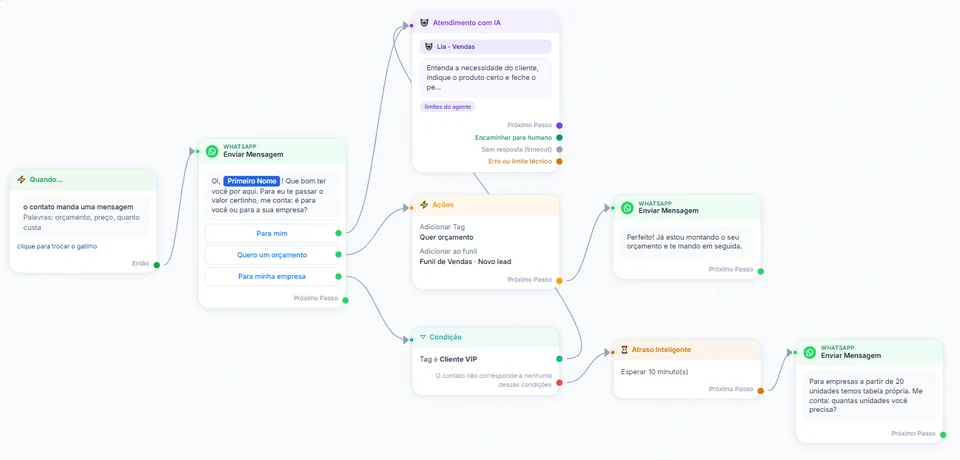
InvestCRM screen: a flow with the Atendimento com IA block and its four outputs (Próximo Passo, Encaminhar para humano, Sem resposta (timeout) and Erro ou limite técnico), wired to message, action and condition blocks
Real InvestCRM screen, with sample data.

From the Business plan

2. What the AI cannot solve goes to the department queue, with a deadline that only runs in business hours

Starts when

Under Settings → Atendimento humano (human service), you click Ligar o atendimento humano (turn on human service; it comes off on every account).

How to set it up

  1. In Equipe e setores (team and departments), create the departments (Sales and Billing, for example), add who answers in each one and pick the Setor que recebe por padrão (default department). With no department, everything lands in the general queue, visible to the whole team.
  2. In Horários de atendimento (business hours), tick the Dias em que a equipe atende (days the team works), the start and end time, and the Fuso horário (time zone). In Responder em até (minutos), set the first-reply deadline (15 by default).
  3. Write the two messages the customer gets on joining the queue: Dentro do horário de atendimento (during business hours) and Fora do horário de atendimento (outside business hours). The screen itself asks you not to promise a reply time in these texts.
  4. On the agent, turn on the Transferir para setor/pessoa (transfer to department or person) skill. In a flow, the Encaminhar para atendimento humano (hand off to human service) action does the same at the point you choose.

What happens next

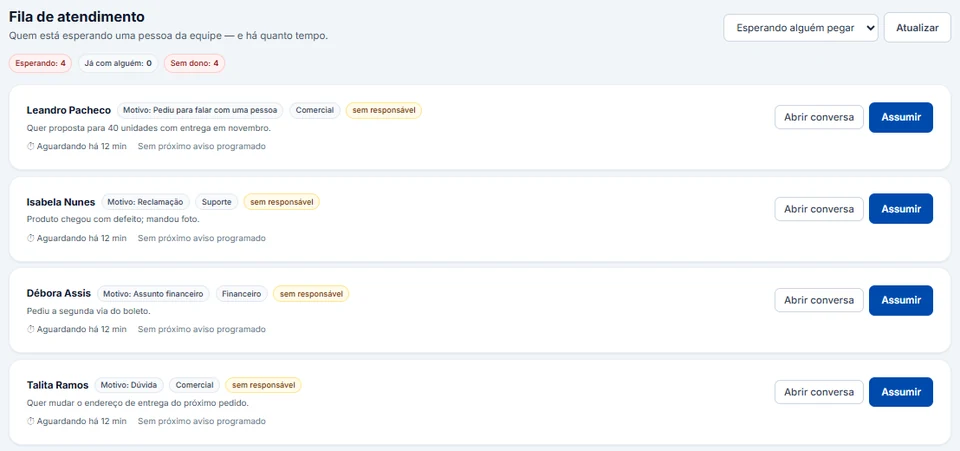
The conversation shows up in the Fila de atendimento (service queue) with the reason, the department, the summary the AI wrote when handing off and how long the customer has been waiting, and automated replies stop for that conversation. The deadline only runs during business hours: a Saturday-night request starts counting at the next working hour. If the 24-hour window has already closed, the notice to the customer is not sent (a Meta rule), but the request stays in the queue and the team can see the notice did not go out.

InvestCRM screen: the Fila de atendimento with the Esperando, Já com alguém and Sem dono counters, and four sample requests showing reason, department, summary, waiting time and the Abrir conversa and Assumir buttons
Real InvestCRM screen, with sample data.

From the Business plan

3. People who wait get the real time the team is back, holidays included

Starts when

The conversation joined the queue and the customer keeps writing, or writes outside business hours.

How to set it up

  1. On the same screen, under Enquanto o cliente aguarda a equipe (while the customer waits for the team), the Primeiro aviso ao cliente (first notice) goes out 1 minute after the handoff and the Segundo aviso ao cliente (second notice) 5 minutes later, with the factory settings. With Responder imediatamente se o cliente insistir (reply at once if the customer insists), someone who writes "is anyone there?" gets the notice right away, once per wait.
  2. Under Quando o cliente escreve fora do horário (when the customer writes outside business hours), keep Avisar fora do horário on and use {{quando}} in the text: the system replaces it with the real next opening. On Saturday night it says "on Monday", not "tomorrow".
  3. Under Feriados e dias fechados (holidays and closed days), keep Usar os feriados nacionais on (Brazil’s Carnival, Good Friday and Corpus Christi are already calculated) and add your state holiday, your city holiday and the year-end break.
  4. Under Se ninguém responder (if nobody replies), choose whether the conversation moves up in the queue and whether the team is reminded. Devolver a conversa para a IA (send the conversation back to the AI) is off on purpose.

What happens next

The customer knows they were heard and when they will get an answer, without the same sentence every hour. When someone on the team replies, every pending notice is cancelled; clicking Assumir (take over) without replying does not cancel them, because the customer is still waiting. The reminder to the team is logged inside the system: no email or WhatsApp goes to anyone on the team.

From the Start plan

4. Monday morning: picking up the people left outside the window

Starts when

In the Caixa de entrada (inbox), the Fechadas (janela venceu) filter (closed, window expired) lists the conversations where 24 hours have passed since the customer’s last message.

How to set it up

  1. Before your first weekend, submit the retorno_solicitacao template for approval in the Utility category (the text is in the templates section just below). It has a single variable: in the inbox, template variables are filled with the contact’s name.
  2. Open each conversation in the filter. With the window closed, the screen says the 24-hour window has closed and offers your approved templates: pick the follow-up and send it.
  3. When the customer replies, the window reopens and the team carries on in free text, as service messages.

What happens next

The weekend request is picked up with a utility template, which in Brazil costs R$ 0.035 per delivery on Meta’s rate card, against R$ 0.3217 for marketing. That is why the text only talks about the customer’s request, with no promotion attached: a promotion alongside makes Meta reclassify the template as marketing.

Message templates

Templates for teams that answer after hours

Inside the 24-hour window, the AI and the team write free text and need no template. The templates below cover what is left for later: the follow-up once the window has closed, the rating request and the announcement of the new hours to people who asked for news. Replace the text in brackets before submitting them.

  • Follow-up on the late-night request

    Utility

    Template name: retorno_solicitacao

    Hi {{1}}, we received your message outside our business hours and the team already has your request. Reply to this message so we can continue the conversation here.

    • Continue

    Why this category

    It follows up on a request the customer made and promotes nothing: this is the "follow up on user actions or requests" use case Meta lists for utility. One variable only, because in the inbox every variable is filled with the name.

  • Rating for a closed conversation

    Utility

    Template name: nota_do_atendimento

    Hi {{1}}, your conversation with [Company] has been closed. From 1 to 5, how well did our answer solve what you needed? Your rating stays with our team only.

    • 5
    • 3
    • 1

    Why this category

    It asks for an opinion on a real conversation, with no request for a public review and no gift. Meta accepts a survey about a previous engagement as utility, but turns down a generic survey in that category.

  • Announcing the extended service

    Marketing

    Template name: novo_horario_whatsapp

    Hi {{1}}! The [Company] WhatsApp now has a virtual assistant that answers questions at night and on weekends. Anything that needs a person is logged for the team, which works [days and hours]. To stop receiving notices like this, reply STOP.

    • See what it answers

    Why this category

    It announces a new service to your base without answering any request: that is marketing, even without a price. So it only goes to people who agreed to receive news, says it is a virtual assistant, does not promise a human reply at night and explains how to leave with STOP.

What it costs

A month of day-and-night service on Meta’s rate card

Example of a business with one number where the AI and the team reply a lot inside the 24-hour window, by day and at night, and the Monday follow-ups and ratings go out as utility. InvestCRM does not charge per message or for the AI: Meta bills the payment method on your account, and OpenAI or Anthropic bill the AI usage on your key.

Sample bill using Meta's official rate card, Brazilian number
What forCategoryMessages a monthBilledPrice per messageCost for the month
Monday follow-ups and rating requests, as a utility templateUtility180180R$ 0.0350R$ 6.30
AI and team replies while the conversation is open, by day and at nightService (support)3,4002,400R$ 0.0350R$ 84.00
Estimated monthly total, paid straight to MetaR$ 90.30

The first 1,000 service messages of each number, every month, are free.

If the utility templates in this bill were classified as marketing, the same month would go from R$ 90.30 to R$ 141.91.

For Meta, a reply from a third-party AI is a service message, the same category as a reply from a person. What weighs most here is how many bubbles each conversation produces: a short, complete answer in one bubble costs less than the same information split into four. With no payment method at Meta, it stops delivering replies after the month’s 1,000th service message.

The volumes are an example to show the math, not data from a customer.

Meta's BRL rate card for Brazilian numbers, effective Oct 1, 2026, checked on Oct 9, 2026. See the rate card at Meta

Run your own numbers in the calculator →

Rules

What Meta, Brazil’s customer-service decree and the LGPD expect from service without hours

A summary of the rules that matter when a bot answers instead of the team, with links to the official text. InvestCRM delivers and organizes the messages; what the agent says and how you serve customers remain the business’s responsibility.

  • Automation yes; no path to a person, no

    Section 2 of the WhatsApp Business Messaging Policy allows automation when replying inside the 24-hour window, but requires prompt, clear and direct escalation paths: an in-chat transfer to a human agent, a phone number, email, web support, an in-store visit or a support form.

    In InvestCRM

    On the Business plan, the Transferir para setor/pessoa skill and the Encaminhar para atendimento humano action put the conversation in the team queue. On Start, without the queue, write your support phone or email in the agent rules and in the message on the Erro ou limite técnico output.

    Source: WhatsApp Business Messaging Policy, section 2

  • Free text only inside the 24-hour window

    The customer service window opens with each customer message and lasts 24 hours. Inside it, the business replies in free text; outside it, only with an approved template. A Friday-night request answered on Monday morning is already outside the window.

    In InvestCRM

    The inbox splits conversations into open (24-hour window) and closed (window expired) and, when the window is closed, offers your approved templates. The queue’s after-hours notice also respects the window: if it has closed, the notice is not sent.

    Source: Meta pricing: customer service window

  • An AI reply is a service message, paid since October 2026

    For Meta, a service message is any non-template message not powered by the Meta Business Agent, whether a person or a third-party AI writes it. Since October 1, 2026, each number gets 1,000 service messages at no charge per month, with no roll-over, and pays from the 1,001st. With no payment method on file, Meta delivers the first 1,000 and stops delivering the rest.

    In InvestCRM

    The InvestCRM agent is a third-party AI (your OpenAI or Anthropic key), so its replies count as service. InvestCRM charges nothing per message and shows under Settings → Agente de IA how many AI calls the account made today.

    Source: Meta pricing: service messages

  • Follow up with a utility template, with no promotion attached

    Under Meta’s category rules, utility is a message tied to a user action or request with no promotional intent; following up on a customer request is one of the examples. A template with mixed content, a notice plus a promotion, is marketing.

    In InvestCRM

    When Meta changes the category of one of your templates, the Meus Modelos table under Settings → WhatsApp shows a notice next to the new category. InvestCRM does not rewrite the template: you choose the category and Meta reviews it.

    Source: Meta template categorization

  • Regulated services in Brazil: a 24-hour channel does not replace a staffed phone line

    Brazil’s Decree 11,034/2022 governs customer service for providers of services regulated by the federal executive branch (art. 1) and does not apply to offering or contracting products and services (art. 2, sole paragraph). It requires access 24 hours a day, 7 days a week, through at least one of the integrated channels (art. 4, caput and § 1), a mandatory phone line (art. 4, § 2), with human agents at least 8 hours a day among the minimum conditions regulators observe (art. 5, I), first access to an agent without asking for data beforehand (art. 4, § 4) and no advertising while people wait unless they consented first (art. 4, § 5).

    In InvestCRM

    InvestCRM works on WhatsApp only: it has no phone line or IVR. If your business is in that group, WhatsApp with AI can be the channel that stays open all night, but the staffed phone line is still yours to run. And the queue’s waiting notices should carry no advertising.

    Source: Decree 11,034/2022 (customer service)

  • The conversation goes to the AI provider

    To reply, the agent sends the relevant part of the conversation to the AI provider. If that provider processes data outside Brazil, article 33 of Brazil’s LGPD applies: international transfers are only allowed in the cases the law lists, such as contractual clauses or the data subject’s specific, highlighted consent.

    In InvestCRM

    The key belongs to your business, so the contract with OpenAI or Anthropic is yours too. In InvestCRM the key is encrypted and the screen only shows its last 4 characters, and "Entender fotos e áudios" (understand photos and audio) comes off. The messaging policy also says not to ask for full card or ID numbers on WhatsApp: put that in the agent rules.

    Source: Brazil’s General Data Protection Law (Law 13,709/2018)

Rules checked against the official sources on Oct 18, 2026. This is not legal advice: when in doubt, ask your professional council.

Plan

Which plan for day-and-night service

For the full design on this page, the plan is Business. The department queue, business hours with holidays, the first-reply deadline and the waiting notices are part of human service, which starts there. Business is also where the AI, once business hours are set, knows on every message whether the business is open or closed at that moment and when it opens again, and it fits 5 agents (one for sales and one for billing, for example) and you plus 3 people.

Just the AI answering at night, with no queue? Start is enough: the AI default reply, the fixed text on the error output, the away message and Monday’s follow-up from the inbox all work there, with 1 agent and 2 active automations. The path to a person, in that case, is the phone or email written in the message.

On Grátis (free), the agent only talks in the test chat: you can build it and try it before you subscribe.

InvestCRM plans: price, limits and features of each one
FeatureGrátisStartBusinessEnterprise
Price per monthR$ 0R$ 147R$ 297R$ 597
Yearly (35% off)R$ 0R$ 1,146.60 a year (same as R$ 95.55 a month)R$ 2,316.60 a year (same as R$ 193.05 a month)R$ 4,656.60 a year (same as R$ 388.05 a month)
Human handoff with queues and departmentsNot includedNot includedIncludedIncluded
AI agents1, test chat only15Unlimited
Active automationsNot included21050
People on the accountJust youYou plus 1You plus 3You plus 15
Automatic chat assignmentNot includedIncludedIncludedIncluded

See all plans and pricing →

Questions

Questions from teams that want WhatsApp answering all night

Does the AI really answer at night, on Sunday and on holidays?

It does, as long as the setup does not silence it. The agent has no opening hours: it answers when the message arrives. Four settings can leave a customer unanswered: the account’s daily call limit (Settings → Agente de IA); the default reply’s frequency, which comes set to Só depois de 24 horas and does not answer again anyone already served in that period; the agent’s Limites da conversa, which end the conversation after 60 minutes without a customer reply or after 20 replies; and the away message, which knows nothing about holidays and stays silent on a weekday holiday inside the hours you set. For the whole night, use Toda vez que ele escrever.

Will the customer know they are talking to an AI?

You decide how the agent introduces itself. Under Assinatura das mensagens (message signature) in the agent profile there are Compacto, Completo and Sem assinatura formats, and the preview shows what the customer sees. We recommend making clear it is a virtual assistant and saying when the team is available.

How much does it cost to leave the AI on all night?

Nothing extra in InvestCRM: the AI is included in the paid plans. AI usage is billed by OpenAI or Anthropic on your key, and the replies count as Meta service messages, with 1,000 at no charge per number every month. Run your numbers in the calculator.

Can the team reply from their phones in the morning?

Yes, with Coexistence. Under Settings → Atendimento humano, the option "Pausar a IA quando um atendente responder (inclusive pelo celular)" (pause the AI when an agent replies, including from the phone) comes off; when on, a team reply pauses the AI for that customer only. Replies sent from WhatsApp for Windows or from a watch do not reach the system.

What if nobody is on call over the weekend?

The AI keeps answering what it knows. What it hands to the team stays in the queue with a reason and a summary, the customer gets the notice with the real next opening, and the deadline only starts when business hours begin. On Monday, the team uses the expired-window filter and the follow-up template.

Keep reading

To set up after-hours service

Start free on InvestCRM

The Free plan has no time limit and needs no card. Connect your number through the Meta window and try the system.