
AI customer service
AI customer service on WhatsApp, with an agent that knows your business
The InvestCRM AI agent is an AI chatbot for WhatsApp that answers your customers using what you taught it: files, web pages and rules. It runs on your own OpenAI (ChatGPT) or Anthropic (Claude) key and calls in someone from your team when needed. Answering customers starts on the Start plan.

How it is built
A 5-part editor, no coding
You build the agent in 5 parts: Profile, Behavior, Knowledge, Settings and External links. Before turning it on, the Test agent button opens a test chat that no customer sees.
- Profile: name, nickname, role and company, how the signature shows in the message (compact, full or none), the part it plays (salesperson, SDR, support, onboarding, receptionist), the tone, the reply format (short, long or automatic) and the agent’s goal.
- Behavior: the conversation stages, the skills and the rules on what it must and must not do, up to 8,000 characters.
- Knowledge: the bases it checks before replying.
- Settings: creativity, maximum reply length, how many previous messages it reads, when to close if the customer stops replying and the words that hand the chat to a human.
- External links: the links the agent sends to customers, so you can change a link everywhere at once.
Knowledge
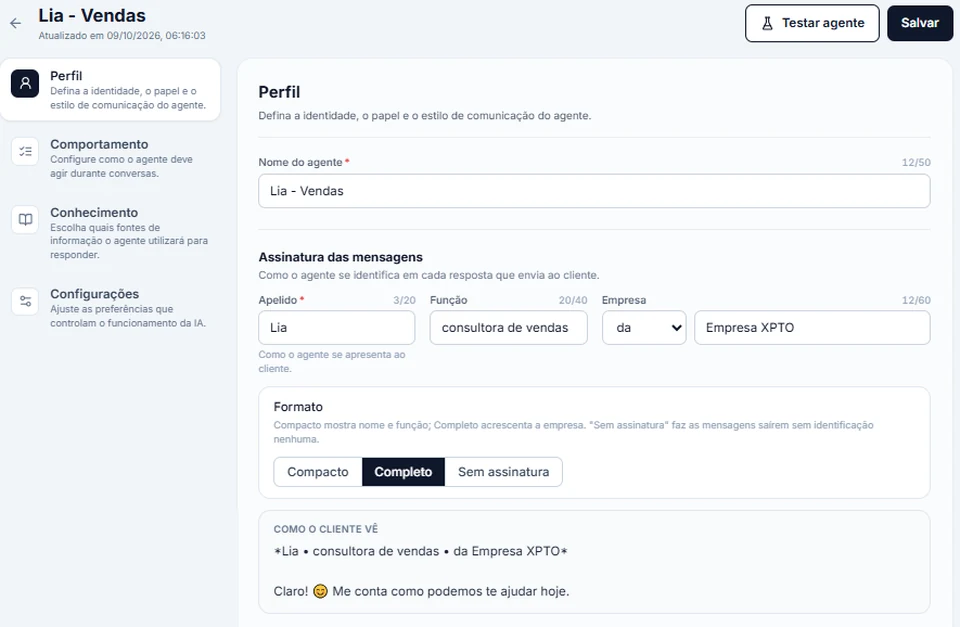
It learns from your files and your website
Each knowledge base can be pasted text, a file (PDF, Word as DOCX, TXT, Markdown or CSV, up to 15 MB) or the address of a page on your website. Each base holds up to 300 thousand characters, and you tick which bases each agent may check.
With an OpenAI key, the agent searches for the passages closest to the customer’s question. With an Anthropic key, when the agent’s bases add up to 40 thousand characters or less, they go to Claude in full; above that, it searches by the words in the question.
Skills
Beyond replying: look things up, transfer and spot objections
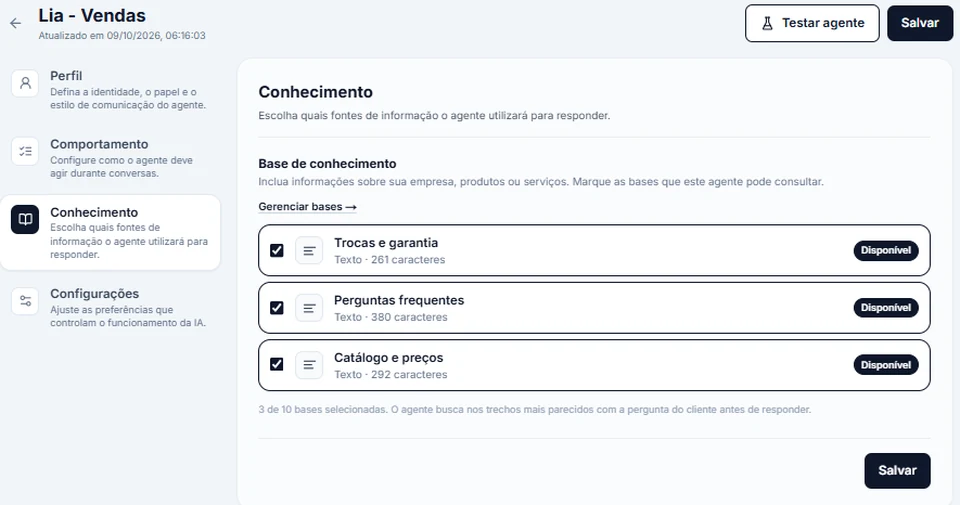
Skills are what the agent can do during the chat. There are three kinds:
- Calendar: helps the agent understand dates like "tomorrow" and "Friday".
- Look up an external system (API): the agent checks one of your systems (orders, schedule, records) before replying.
- Transfer to a department or person: hands over the chat and applies a label to the contact.
It also spots objections like "it’s too expensive" and "I’ll think about it" before pushing, and follows the rules you wrote for each one.
OpenAI or Anthropic
The AI is yours: an OpenAI or Anthropic key
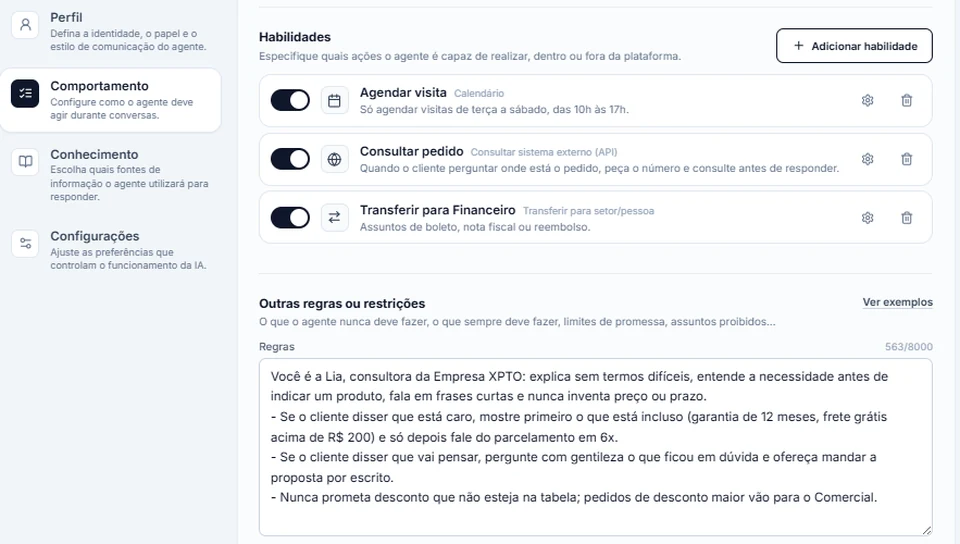
Each account picks one AI company: OpenAI (ChatGPT) or Anthropic (Claude). One at a time: with one company’s key saved, the other is locked until you remove the first.
- You pay for usage straight to the AI company, on your key. On paid plans, InvestCRM charges nothing extra for the AI.
- Daily call limit: it starts at 500 and you can change it any time. Past the limit, the AI stops replying until the next day.
- The key is stored encrypted and never shows again: only the last 4 characters appear.
Photos and audio
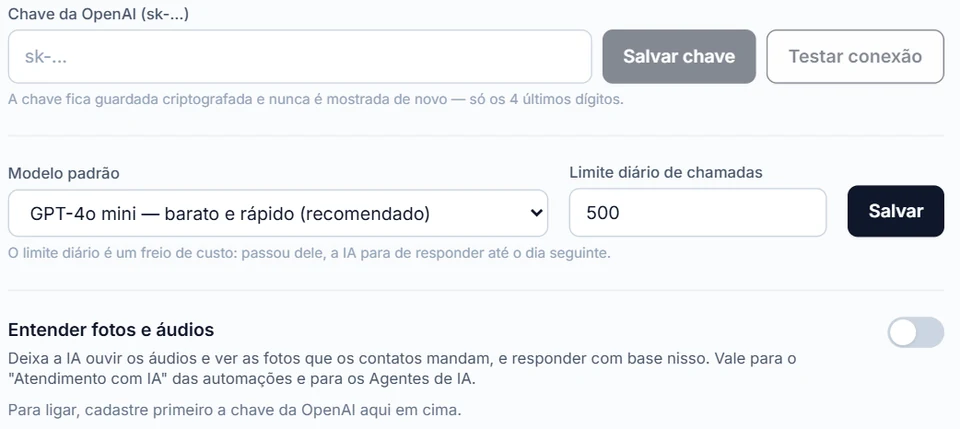
It listens to audio and understands photos, once you turn it on
The "Understand photos and audio" option is off on every account. To turn it on, you accept a notice about the use of that data once. When on, the AI looks at the photos the customer sends and transcribes voice notes, and your agent reads the transcript under the audio, in the inbox.
Audio is only transcribed with an OpenAI key. On an account that uses only Claude, the AI asks the customer to type instead.
Human handoff
It calls a person in at the right time
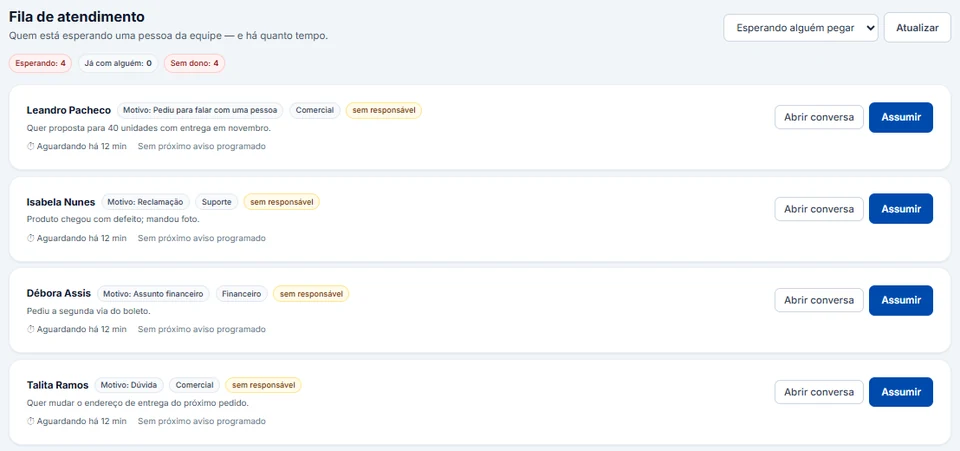
When the customer asks for a person, or the topic belongs to a department, the agent hands the chat to the team. On the Business and Enterprise plans, the chat goes into the human support queue, by department, with the reason and the wait time, and someone clicks Take over. Later, it can go back to the AI with "Return to AI".
What if someone on the team replies directly? There is a "Pause the AI when an agent replies (including from the phone)" option, which is off by default. When on, a reply from a team member, in the inbox or in the WhatsApp Business phone app, pauses the AI for that customer only, and you choose after how many minutes it comes back on its own (0 = only when someone returns it). When off, replying from the phone does not pause the AI.
24/7 support
It answers overnight, on weekends and on holidays
The agent answers when the message arrives, at any hour, including overnight, on weekends and on holidays. The AI has no opening hours: what counts is the account’s daily call limit.
It knows the current day and time. With your business hours set in Settings, Human support (Business and Enterprise plans), it also knows whether the business is open or closed at that moment, counting national holidays and the days you mark as closed, and when it opens again.
If it hands the chat to the team outside those hours, the customer gets the out-of-hours notice (it is on by default, and you can change the text), and the chat waits in the queue until someone clicks Take over.
Follow-up
It follows up when a customer stops replying
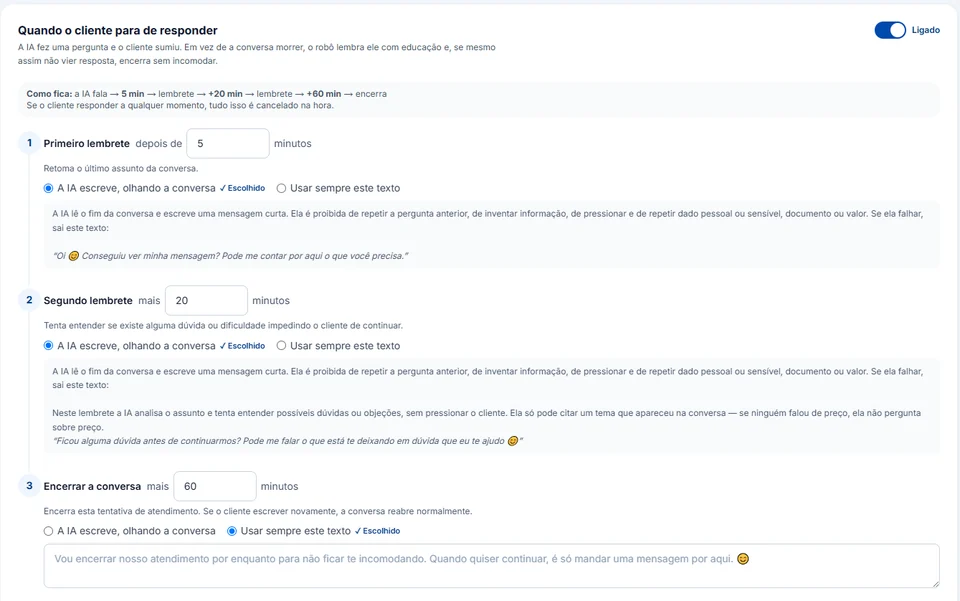
When the AI asks a question and the customer goes quiet, InvestCRM can send up to 2 reminders and then close the chat politely. You set the minutes for each step and choose whether the AI writes them by reading the chat or the same text goes every time. If the customer replies at any point, whatever is left is cancelled.
Follow-up is part of automations, which start on the Start plan.
No overpromising
What the agent does not do
- It does not book appointments on its own: only when connected to your schedule (Odonto Invest or another system through an API).
- It does not transcribe audio with an Anthropic key: for that, the account needs an OpenAI key.
- It does not use two AI companies on the same account.
- It does not reply after hitting the daily call limit: it comes back the next day, or when you raise the limit.
- On the Grátis plan, the agent only talks in the test chat. Answering your customers starts on the Start plan.
Meta also has its own AI agent, Meta Business Agent, which you turn on under Tools in the WhatsApp Business app (WhatsApp Help Center). The InvestCRM agent is a different one: it works inside InvestCRM, together with the pipeline, the human support queue and the automations, and uses the AI key you choose.
Plans
AI on each plan
On paid plans the AI costs nothing extra on InvestCRM. What changes from one plan to the next is how many agents you build and what comes with them:
| Feature | Grátis | Start | Business | Enterprise |
|---|---|---|---|---|
| Price per month | R$ 0 | R$ 147 | R$ 297 | R$ 597 |
| AI agents | 1, test chat only | 1 | 5 | Unlimited |
| Active automations | Not included | 2 | 10 | 50 |
| Human handoff with queues and departments | Not included | Not included | Included | Included |
| API and webhooks | Not included | Not included | Included | Included |
Keep reading
Other parts of InvestCRM
Start free on InvestCRM
The Free plan has no time limit and needs no card. Connect your number through the Meta window and try the system.