
CRM and sales pipeline
A WhatsApp CRM with a sales pipeline
The InvestCRM CRM turns WhatsApp conversations into sales pipelines: each deal becomes a card with a value, an owner, tasks and, when it does not close, the loss reason. It runs on the number connected through Meta’s official API and starts on the Start plan.

Sales pipeline
Every conversation becomes a deal in the pipeline
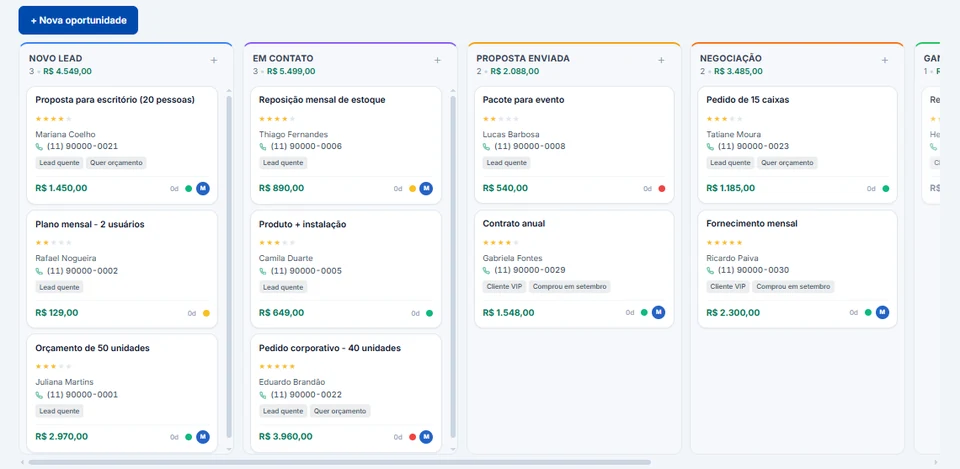
The pipeline shows deals in columns, one per stage. Each card shows the contact, the value, the owner and the labels, and you drag the card as the deal moves. The first pipeline comes with the stages Novo lead, Em contato, Proposta enviada, Negociação, Ganho and Perdido (new lead, in contact, proposal sent, negotiation, won and lost); you can rename, add and reorder stages.
- When you mark a deal as lost, you pick a ready-made reason (price, no reply, went with a competitor…) or write your own.
- The card shows a task traffic light and warns you when the deal has sat in the same stage for days.
- Filters by owner, status, stars, value, source, label, area code and forgotten deals.
- Notes on the deal, with ready-made texts to record what was agreed.
- Three views: Pipeline (the board), List (the table) and Conversion, a report with the win rate, the average time in each stage and the most common loss reasons. Conversion is on the Enterprise plan.
Tasks and calendar
Tasks and a calendar so no follow-up is forgotten
Each task can be tied to a deal in the pipeline or to a contact. On the Tasks screen you see open, overdue or all tasks, drag them to change the priority (the order is saved) and complete them with one click on the checkbox.
The Calendar shows the same tasks in a monthly grid. Clicking an empty day creates a task on that date, and clicking a task opens it for editing.
Inbox
A shared inbox with teams and queues
Conversations on your number land in one inbox for the whole team, and each person signs in with their own access. The inbox comes with the Grátis plan; inviting people starts on Start.
- A menu with All chats, Unassigned, Assigned to me, Reminders, Favorites and each team member’s chats, plus filters for open, unread and by label.
- Internal notes the customer never sees, and the history of what happened in the chat, such as a label being added.
- A warning showing when Meta’s 24-hour window ends, with the time.
- Automatic chat assignment, from the Start plan.
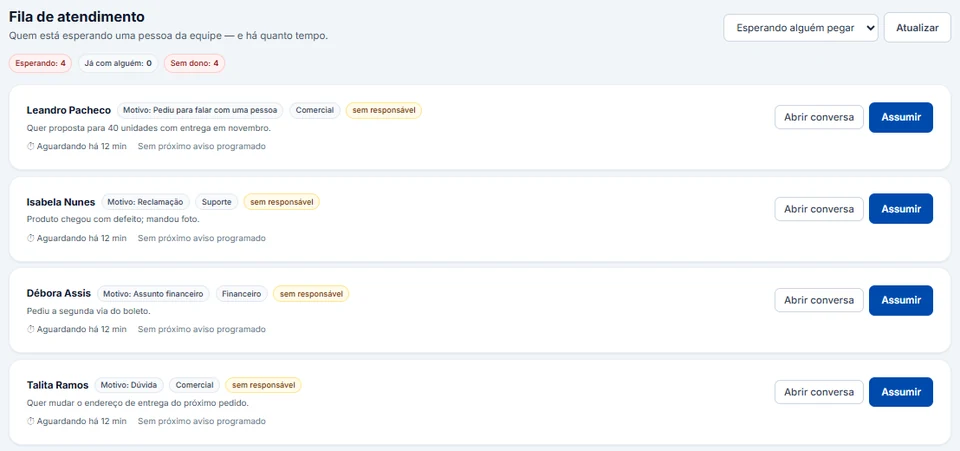
- A human support queue by department, with each customer’s reason and wait time and a Take over button, from the Business plan.
Pipeline on autopilot
The pipeline moves with your automations and your ads
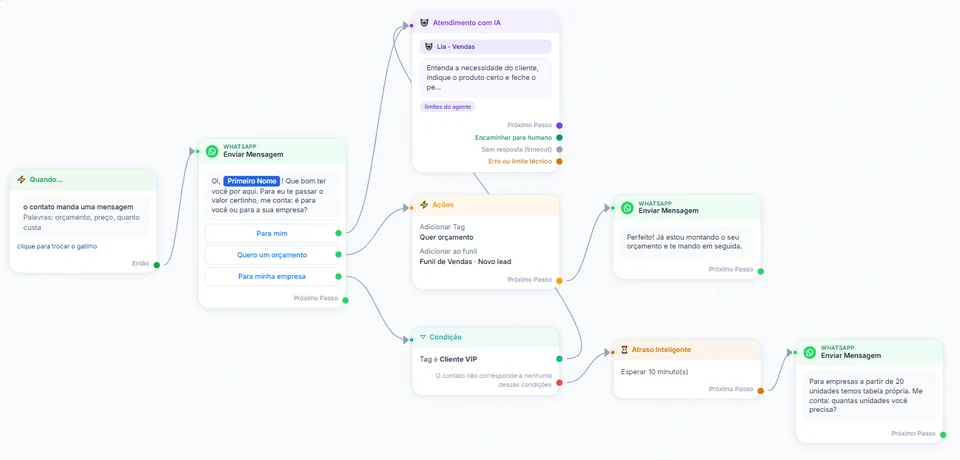
An automation can apply labels and add the contact to a pipeline on its own, based on the message they sent. The AI agent also answers inside the flow and hands the chat to the team when needed (AI customer service).
On the Business and Enterprise plans, pipeline stages also report back to your ads: the stage marked "Qualified lead" sends the event to Meta, and the Small, Medium and Large levels become conversions in Google Ads. See how in Meta and Google conversions.
Plans
CRM limits on each plan
The CRM (pipeline, tasks and calendar) starts on the Start plan. The Grátis plan has the inbox on your official number, without the CRM. The numbers below are the same ones the system uses on your account.
| Feature | Grátis | Start | Business | Enterprise |
|---|---|---|---|---|
| Price per month | R$ 0 | R$ 147 | R$ 297 | R$ 597 |
| Sales pipelines | Not included | 1 | 5 | Unlimited |
| Tasks and calendar | Not included | Included | Included | Included |
| People on the account | Just you | You plus 1 | You plus 3 | You plus 15 |
| Contacts included | 100 | 1,000 | 5,000 | Unlimited |
| Custom fields | 5 | 30 | Unlimited | Unlimited |
| Automatic chat assignment | Not included | Included | Included | Included |
| Human handoff with queues and departments | Not included | Not included | Included | Included |
| Pipeline conversion report | Not included | Not included | Not included | Included |
Keep reading
Other parts of InvestCRM
Start free on InvestCRM
The Free plan has no time limit and needs no card. Connect your number through the Meta window and try the system.