From the Business plan
1. Triage by specialty, with a department and a reply deadline
Starts when
Someone writes for the first time and the AI agent, set to the Recepcionista (receptionist) profile, works out whether the topic is medicine, aesthetics, nutrition, physiotherapy or psychology.
How to set it up
- In Settings → Atendimento humano, create one department per specialty (Aesthetics, Nutrition, Physiotherapy, Psychology) and, under Editar pessoas (edit people), add whoever handles that schedule.
- Fill in the Horários de atendimento (business hours) and the Feriados e dias fechados (holidays and closed days): the first-reply deadline only runs during clinic hours.
- In Settings → Agente de IA, create the agent with the Recepcionista profile and, on the Behavior tab, add one Transferir para setor/pessoa (transfer) skill per specialty. Besides handing over the chat, it applies a label to the contact, such as "Nutrition patient".
- Under Outras regras ou restrições (other rules), write what the agent never does: comment on symptoms or exams, quote fees that are not in the knowledge base, promise results.
- Under Prazo e lembretes (deadline and reminders), set Responder em até (minutos) (reply within, 15 by default) and how many times the team gets nudged.
- Connect the agent to the chats: in Automations → Básicas, use Configurar com IA (set up with AI) on the Resposta padrão (default reply). The Atendimento com IA (AI service) block starts with one of the account's agents already picked; check that it is the Recepcionista and publish. Without this step the agent exists but answers no one, and this automation takes 1 of the plan's active automation slots.
What happens next
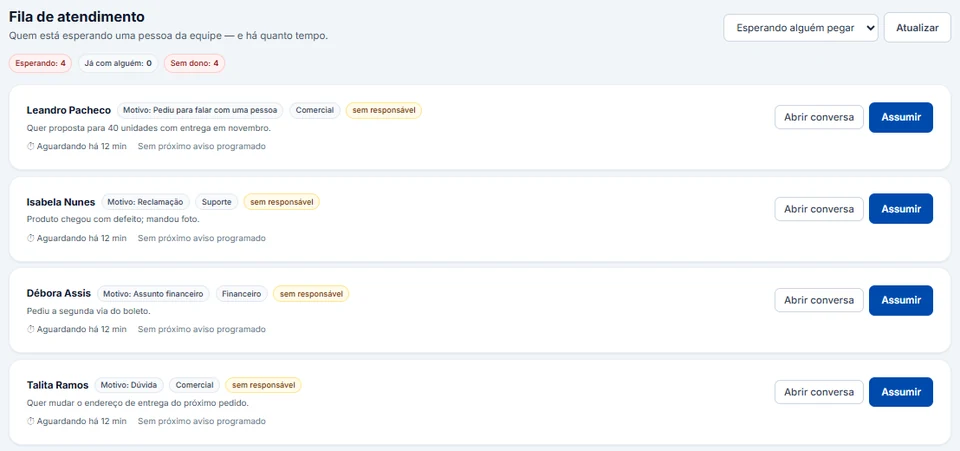
The chat reaches the Fila de atendimento (support queue) with the reason and the department. Whoever clicks Assumir (take over) owns it, the deadline only ends when someone actually replies, and the Observação interna (internal note) keeps what was agreed out of the patient's view. The department organizes the queue, but it does not hide the chat from the rest of the team.