
Skip to content

For law firms

WhatsApp for law firms: intake, a queue per practice area and the Brazilian Bar's rules

How to run a law firm's WhatsApp in InvestCRM, on Meta's official API, within what the Code of Ethics and Provision 205/2021 of the OAB (the Brazilian Bar Association) allow: an AI intake that records the case and does not answer legal questions, a queue per practice area with a response deadline, case updates that don't expose the file, and a newsletter that only goes to clients.

The problem

Everything lands on the firm's WhatsApp, and nearly all of it is confidential

The firm's number gets requests for "just a quick bit of guidance", clients asking about their case at 10 p.m., referrals of referrals and documents photographed on a kitchen table. Whoever answers is usually the secretary or the intern, on a phone, and the lawyer-client conversation, which the Code of Ethics presumes confidential, sits on a device that leaves with whoever leaves the firm.

  • Free legal advice over chat: answering legal questions from people who are not yet clients, automatically and to anyone, is what Provision 205/2021 calls commodifying the profession. Answering by hand, one by one, eats the lawyer's day.
  • Nobody owns the conversation: a message comes in and no one knows whether it is employment, family or social security law, or who was supposed to reply. The client tells the same story three times.
  • Confidentiality on a staff phone: screenshots of documents, reports and voice notes describing the case stay on the team's phones, with no record of who saw what.
  • The phone's broadcast list: sending legal news to every contact is mass mailing ("mala direta"), which the Provision forbids, and offering services by message is client solicitation, forbidden by article 7 of the Code of Ethics.

None of the setups below puts the software in the lawyer's place. InvestCRM organises intake, the queue and the history; whoever advises the client is always a professional admitted to the OAB.

Setups in InvestCRM

Four setups for the firm's routine

Names in bold are the on-screen labels (in Portuguese). The first two form the front door (AI and queue); the other two look after existing clients. How the agent works inside is covered in AI customer service.

From the Start plan

1. AI intake that records the case and gives no legal opinion

Starts when

Someone messages the firm's number (trigger O contato envia uma mensagem), including people who arrive through the website link or QR code: add the link's prefilled phrase to the trigger words.

How to set it up

  1. In Settings → Agente de IA, click Novo agente and pick the Recepcionista profile and the Formal e Institucional tone. In Assinatura das mensagens, type "Virtual assistant" as the role and the firm's name as the company, in the Completo format: every reply is labelled, and nobody mistakes the AI for the lawyer.
  2. Turn on Mandar uma mensagem fixa na primeira resposta da IA with a text such as: "Hello! I am the virtual assistant of [Firm]. I will take down your case for a lawyer to review. We do not give legal advice here." That first message goes out exactly as written, without going through the AI.
  3. In Regras, write the boundary: do not answer questions about the law, deadlines, claim value or chances of success; do not discuss fees; ask for name, city, area of the problem and a short summary; and hand to a person anyone who asks for a lawyer or mentions urgency or a deadline. In Palavras que passam para um humano, add "advogado" (lawyer), "urgente" (urgent) and "prazo" (deadline) to the ones already filled in: the field looks for the word exactly as the client types it, and Brazilian clients write in Portuguese.
  4. Under Habilidades, create one Transferir para setor/pessoa skill per practice area (Employment, Family, Social security…), each with its own Tag aplicada ao contato. The AI picks the area from the summary, and the tag marks the contact.
  5. Before putting the agent into the flow, chat with it in Testar agente and ask legal questions on purpose, to check that it declines and takes notes.

What happens next

People know from the first message that they are talking to a virtual assistant, and the case arrives written up and tagged by area. That is the chatbot use Provision 205/2021 allows: answering first questions about the firm and collecting information, without taking the decision or the responsibility away from the lawyer. From the contact's second message on, asking for a person, for a lawyer or using an urgency word takes the conversation away from the AI at once, without calling the model. The first message always goes through the model, and there the model is the one that hands over, through its fixed rule of passing on anyone who asks for a person and through what the Regras say.
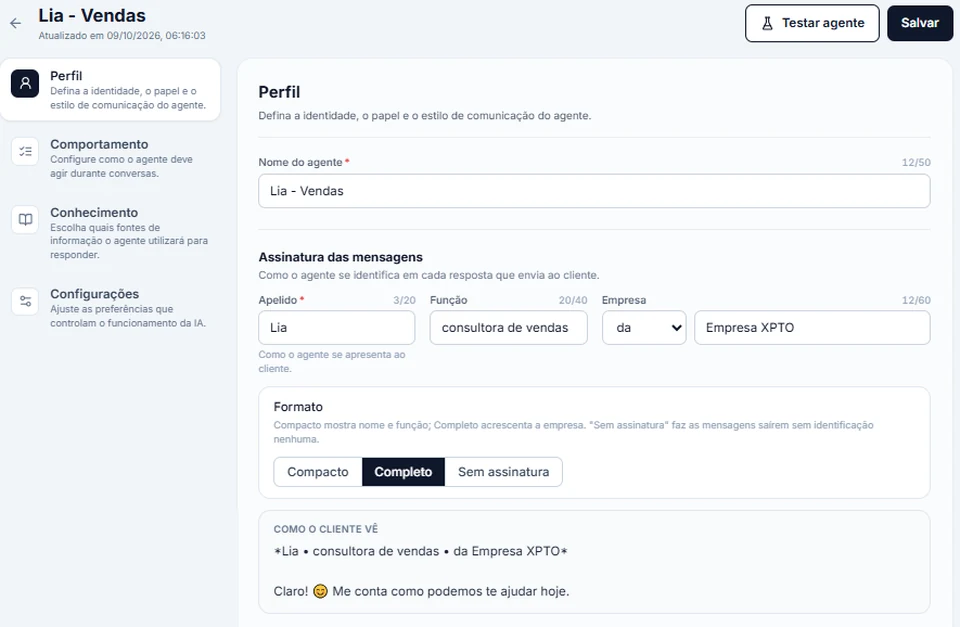
InvestCRM screen: the Profile tab of the AI agent editor, showing the agent's name, the message signature (nickname, role and company), the Compact, Complete and No signature formats, and the preview of what the customer sees
Real InvestCRM screen, with sample data.

From the Business plan

2. A queue per practice area, with office hours and a response deadline

Starts when

The AI handed the conversation on through the Encaminhar para humano exit of the Atendimento com IA block, either as an area transfer or because the person asked for a lawyer.

How to set it up

  1. Invite the lawyers under Membros da equipe. Then, in Settings → Atendimento humano, click Ligar o atendimento humano and, under Equipe e setores, open one department per practice area (Employment, Family, Social security) with its lawyers in Quem atende neste setor.
  2. The firm's office hours go in Horários de atendimento, and the first-reply target in Responder em até (minutos) (15 by default). A client joining the queue gets the Dentro do horário de atendimento text or the Fora do horário de atendimento one: neither should promise when the lawyer will reply.
  3. Under Motivos que a conversa pode carregar ao chegar na fila, create the firm's own reasons, such as "First consultation", "Client with an open case" and "Documents".
  4. In the flow, the Encaminhar para humano exit goes to a Condição on the first area's tag (Tag é "Employment"). On the Sim exit, an Ações block with Encaminhar para atendimento humano, the area's department under "1. Quem vai atender?" and A IA identifica o assunto under "2. Qual assunto será registrado?". A Condição only has Sim and Não, so each further area is another Condição hanging off the previous one's Não exit.
  5. The last Não exit goes to an Ações block with Encaminhar para atendimento humano set to Fila geral — qualquer pessoa da equipe pega. That is the route for requests for a lawyer, urgency words and the AI's limit, which arrive with no area tag: once the AI exit is wired to a block, that block is what puts the conversation in the queue, and a loose Não leaves the urgent case out of it.

What happens next

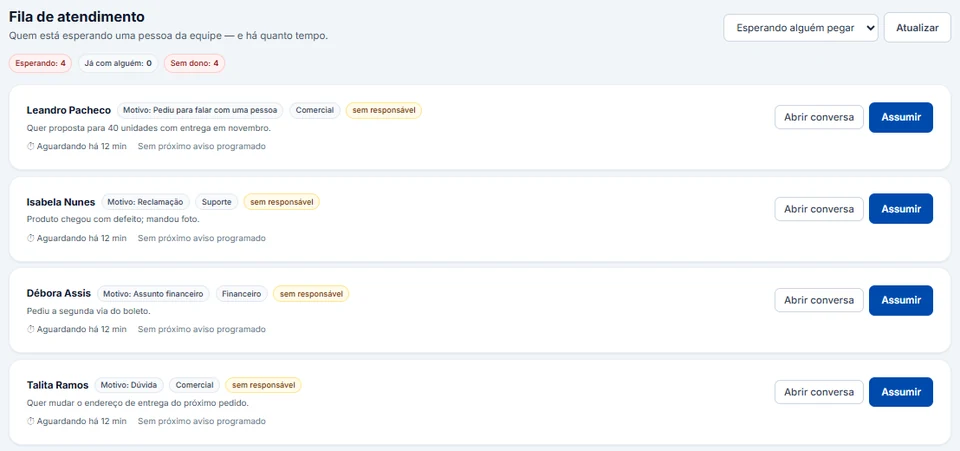
The case shows up in the Fila de atendimento with the reason, the department and how long the person has been waiting, and the area's lawyer clicks Assumir. The deadline only runs during office hours: a request that arrives on Saturday night starts counting at the next working hour. The conversation stays on the firm's number, with the history kept in the account rather than on someone's phone.

InvestCRM screen: the human support queue with four sample conversations waiting for a team member, each showing the reason, the department, an unassigned badge, the waiting time and the Open conversation and Take over buttons
Real InvestCRM screen, with sample data.

From the Start plan

3. Case updates that don't expose the file

Starts when

Whoever handles the case applies the "Case update" tag to the client on the Contatos screen (trigger Tag atribuída ao contato).

How to set it up

  1. The notice text is the andamento_do_caso template, further down, approved in the Utility category: only the name as a variable, an invitation to reply, and no case number, opposing party's name or content of the decision.
  2. The flow starts on the Tag atribuída ao contato trigger with the "Case update" tag; the next step is a Modelo aprovado block with that notice, its {{1}} variable mapped to First Name.
  3. The last step is an Ações block with Remover Tag "Case update": once the tag is gone, the same client can get it again at the next development in the case.
  4. Whoever follows the case adds the tag from the Contatos screen, to one client or several together. Added from the Inbox, the tag only marks the contact and does not fire the flow; there, with the window closed, the same template goes out by hand.

What happens next

The client gets the notice even if they have not written for weeks, because it is an approved template. When they reply, the 24-hour window opens and the lawyer explains the news in the chat, in free text, from the Inbox. The Observação interna (o contato NÃO vê) keeps what only the team needs to know about the case.

From the Start plan

4. A legal newsletter only for clients and people who asked

Starts when

A broadcast scheduled for a date and time, with the audience chosen by tag.

How to set it up

  1. Give the "Informativo" tag to the firm's clients and to people who asked to receive it, for instance through a "Send me the newsletter" button in the welcome flow.
  2. Under Broadcasts, pick the informativo_juridico_mensal template (Marketing category) and, in Público alvo, set the Tag condition to "Informativo". With no condition, the broadcast would go to every contact.
  3. With + Excluir público, leave out anyone who ended their engagement and chose not to keep receiving it (an "Ex-client" tag, for example).
  4. On the template's "Read it" button, click conectar › and connect a step that sends the newsletter text: whoever tapped has opened the conversation, so the next message goes out without another template.
  5. Tick Confirmo o opt-in, schedule it and, for a short list, choose the Devagar pace (6 per minute).

What happens next

The content only reaches clients and people who asked beforehand, the people Provision 205/2021 allows letters and communications to be sent to (Annex, "Correspondências e comunicados"), and it offers no services, as article 46, sole paragraph, of the Code of Ethics requires. Anyone who types SAIR, PARAR, STOP, CANCELAR or DESCADASTRAR goes onto the block list and skips the next issue; tapping a button does not unsubscribe. The report shows sent, delivered, read and clicked.

Message templates

Four templates for the firm, in the right category

To message a client first outside the 24-hour window, you need a Meta-approved template. The category sets the price of each delivery, and the Code of Ethics sets what the text may say. Replace whatever is in square brackets before submitting it. Any variable other than the name comes from a contact field (Fields 1 to 5, which can be renamed under Custom fields), filled by a spreadsheet import or, on Business, through the API.

  • Case update

    Utility

    Template name: andamento_do_caso

    Hello {{1}}. There is an update on your matter with [Firm]. To hear the details, reply to this message and the team will get back to you here.

    • Tell me more

    Why this category

    It concerns a service the client already hired and offers nothing, so it fits utility. Because of confidentiality, the text gives neither the case number nor what happened: the detail goes in the chat, after the client replies. The only variable is the name because sending by hand from the Inbox puts the contact's name into every variable.

  • Meeting booked

    Utility

    Template name: reuniao_com_advogado

    Hello {{1}}. Your meeting with [lawyer's name] is booked for {{2}}. If you cannot make it, reply to this message and we will find another time.

    • Confirmed
    • I need to reschedule

    Why this category

    It confirms an appointment the client made, with no invitation to another service. Naming the lawyer who will attend supports the personal service the Provision asks for and does not change the category.

  • Missing document

    Utility

    Template name: documento_do_caso_pendente

    Hello {{1}}. To move your matter forward we still need: {{2}}. Personal documents with full numbers (ID, CPF, bank details) go through [the firm's secure channel]; anything else can be sent as a reply to this message.

    Why this category

    It asks for something on an open matter, with nothing promotional: utility. WhatsApp policy asks businesses not to request full identity document or financial account numbers in the chat, which is why the template separates what comes in here from what goes through another channel.

  • Monthly newsletter

    Marketing

    Template name: informativo_juridico_mensal

    Hello {{1}}! The monthly newsletter from [Firm] is out, on [topic, for example: changes to retirement rules]. It is general content, not an analysis of your case. [Lawyer's name], OAB/[State] [number]. To stop receiving the newsletter, reply STOP.

    • Read it

    Why this category

    The same content for everyone is not a notice about a case: for Meta it is marketing, even though it sells nothing. For the OAB, the text offers no services, mentions no fees or results, carries the signer's name and Bar number and only goes to clients and to people who asked.

What it costs

A month of a law firm's messages, on Meta's rate card

Example of a firm with one number: case updates, meeting confirmations and document requests as utility, the monthly newsletter as marketing, and the intake and lawyers' replies inside the 24-hour window, billed as service. InvestCRM does not charge per message: Meta bills the account's payment method directly.

Sample bill using Meta's official rate card, Brazilian number
What forCategoryMessages a monthBilledPrice per messageCost for the month
Case updates, meetings and document requestsUtility420420R$ 0.0350R$ 14.70
Monthly newsletter for clients and subscribersMarketing120120R$ 0.3217R$ 38.60
Intake and lawyer conversations with the window openService (support)1,600600R$ 0.0350R$ 21.00
Estimated monthly total, paid straight to MetaR$ 74.30

The first 1,000 service messages of each number, every month, are free.

If the utility templates in this bill were classified as marketing, the same month would go from R$ 74.30 to R$ 194.72.

The newsletter is the most expensive line per message. Sending it only to people who asked, besides being what the OAB allows, avoids blocks and reports, which Meta uses to limit how much the number can send. For your own firm's volumes, use the calculator.

The volumes are an example to show the math, not data from a customer.

Meta's BRL rate card for Brazilian numbers, effective Oct 1, 2026, checked on Oct 9, 2026. See the rate card at Meta

Run your own numbers in the calculator →

Industry rules

What the OAB and Meta require, and what the software does

A summary of the Brazilian rules that apply to a law firm's messages, with a link to the official text. InvestCRM delivers and organises the messages; the content and the conduct remain the lawyer's responsibility.

  • A chatbot is fine; a bot answering legal questions is not

    The Annex to Provision 205/2021 allows a chatbot to make communication easier, answer a prospective client's first questions and collect data, information or documents, as long as it does not remove the personal nature of the service or take away the lawyer's image, decision-making power and responsibility. It does not allow apps that automatically and indiscriminately answer legal questions from non-clients. On 8 December 2025 the OAB said its review of the Provision had entered the final stage; by the time this page was checked we had found no new text published.

    In InvestCRM

    The agent follows what is in the Regras and the knowledge base; it does not know on its own what a legal question is. The refusal has to be written into the Regras, the hand-off to the lawyer into the Palavras que passam para um humano, and the check in Testar agente comes before the agent goes into the flow.

    Source: OAB Provision 205/2021, Annex

  • Mass mailing is banned; messages to specific people are not

    The Provision forbids letters and communications sent to the public at large ("mala direta") and only allows them to clients, personal contacts and people who asked for them or agreed beforehand, with no commercial character, no solicitation and no offer of services. A WhatsApp group is acceptable when it brings together specific people the lawyer knows. The rule also separates active advertising, which reaches people who never looked for the firm, from passive advertising, which reaches those who searched for the information or agreed to receive it (art. 2, VI and VII).

    In InvestCRM

    A broadcast only goes to whoever matches the audience condition (a tag, for example), and the system asks for Confirmo o opt-in before publishing. It does not know who is a client: the firm decides who gets the tag.

    Source: OAB Provision 205/2021

  • No solicitation, and the name and Bar number on display

    The Code of Ethics and Discipline forbids offering services in a way that amounts to soliciting clients (art. 7) and expects advertising to be informative, discreet and sober (art. 39). Phone and internet may carry messages to specific recipients, as long as they offer no services and solicit no clients (art. 46, sole paragraph), and an electronic newsletter is limited to clients and people from the legal field (art. 45). The newer Provision 205/2021 allows communications to people who asked or agreed beforehand; if your mailing reads like a newsletter and goes to non-clients, it is worth asking the local bar section's Ethics Tribunal. Advertising shows the name of the lawyer or the firm and the OAB registration number (art. 44). Soliciting cases is also a disciplinary offence under the Law of the Legal Profession (art. 34, IV).

    In InvestCRM

    A newsletter without the OAB number is a breach by whoever signs it, and nothing in the sending process will flag it: Meta's approval looks at the category and its messaging policy, and InvestCRM sends the text exactly as written. Put the name and Bar number in the marketing template itself and repeat both in the Descrição da Empresa field of the WhatsApp business profile, under Settings.

    Source: OAB Code of Ethics and Discipline (Resolution 02/2015)

  • The conversation with the client is confidential

    A lawyer keeps confidential the facts learned in professional practice (art. 35 of the Code of Ethics); confidentiality is a matter of public order and communications between lawyer and client are presumed confidential (art. 36, § 1). Breaching it without just cause is a disciplinary offence (Law 8,906/1994, art. 34, VII).

    In InvestCRM

    The conversation stays in the firm's account, not on a staff member's phone. Each person signs in with their own login and an access level (Leitor only views; Colaborador replies), two-step verification is available on every plan and, on Business, the activity log shows who did what. A file received only opens through a signed link that expires within 60 to 90 minutes.

    Source: Law of the Legal Profession (Law 8,906/1994)

  • Automation with a clear path to a person

    For Meta, the firm's bot may only chat on its own inside the 24-hour window if the client has a quick, clear way to reach a human being: handing the chat to someone on the team, or giving a phone number or an email address. That sits alongside the Provision, which does not let a chatbot remove the personal nature of the service. The policy also requires opt-in from recipients and honouring every request to stop, made on WhatsApp or elsewhere.

    In InvestCRM

    From the contact's second message on, the Palavras que passam para um humano take the conversation away from the AI without calling the model; on the first, the model itself hands over, through its fixed rule and the Regras. The Encaminhar para atendimento humano block puts the case in the queue. Anyone who types just SAIR, PARAR, STOP, CANCELAR or DESCADASTRAR goes onto the block list; a request made by phone or email you record in the Blacklist window on the Contatos screen.

    Source: WhatsApp Business Messaging Policy

Rules checked against the official sources on Oct 18, 2026. This is not legal advice: when in doubt, ask your professional council.

Plan

Which plan the firm needs

For a firm with staff, the plan is Business. The queue per practice area, with departments, response deadline and reasons, starts there, and so does the activity log, which shows who took over, transferred and closed each queued conversation. It fits you plus 3 people and up to 5 AI agents, one per area if you like.

For a lawyer working alone or with one partner, Start covers the intake with 1 AI agent, the case update and the welcome flow (2 active automations), the newsletter (1,000 broadcast messages a month) and a pipeline to track consultation, proposal and engagement. Without the Business queue, the AI tags the area and the person takes over the chat in the Inbox.

Court deadlines stay in the firm's legal software: InvestCRM does not read court systems or count deadlines. It handles the conversation with the client, the pipeline and the follow-up tasks.

InvestCRM plans: price, limits and features of each one
FeatureGrátisStartBusinessEnterprise
Price per monthR$ 0R$ 147R$ 297R$ 597
Yearly (35% off)R$ 0R$ 1,146.60 a year (same as R$ 95.55 a month)R$ 2,316.60 a year (same as R$ 193.05 a month)R$ 4,656.60 a year (same as R$ 388.05 a month)
People on the accountJust youYou plus 1You plus 3You plus 15
AI agents1, test chat only15Unlimited
Active automationsNot included21050
Broadcast messages per monthNot included1,000UnlimitedUnlimited
Sales pipelinesNot included15Unlimited
Human handoff with queues and departmentsNot includedNot includedIncludedIncluded
Activity logNot includedNot includedIncludedIncluded

See all plans and pricing →

Questions

Questions from whoever runs the firm's WhatsApp

Can the AI answer simple legal questions, like when someone can retire?

Not for people who are not yet clients: answering legal questions automatically and indiscriminately is forbidden by Provision 205/2021. Set the agent up to decline, record the case and pass it to a lawyer. For a client with an ongoing case, the answer also comes from the lawyer, because it depends on the file.

Can I send the newsletter to every contact on my phone?

No. Sending to the public at large is mass mailing, which the Provision forbids. Import the spreadsheet (CSV or XLSX) with the right tag only for clients and people who asked, and use that tag in Público alvo. The system asks you to confirm opt-in before publishing.

Can the lawyer keep replying from their phone?

Yes, through Coexistence, which keeps the firm's number in the WhatsApp Business app and on the API at the same time. Two points matter for a law firm. The app keeps storing the conversations on the device, so the phone counts for confidentiality. And the intake AI only goes quiet when the lawyer replies if the "Pausar a IA quando um atendente responder (inclusive pelo celular)" switch, in Settings → Atendimento humano, is on; it starts switched off.

Does InvestCRM track court deadlines?

No. There is no link to court systems and no deadline counting. In the Pipeline, each consultation becomes a deal with stages such as Intake, Consultation booked, Proposal sent and Engaged, and follow-up tasks show up in Tasks and the Calendar, with overdue ones set apart.

Who on the team sees the conversations?

Whoever you invite, by level: Leitor only views conversations, contacts and reports; Colaborador replies and looks after the pipeline; Editor also handles templates, automations and broadcasts; Administrador manages the team and connections. Only the Proprietário touches the subscription.

Can each partner have their own number?

In InvestCRM, one WhatsApp number is one account. If each partner wants their own number, those are separate accounts, with their own contacts and subscription. On a single number for the whole firm, the queue departments are what split the work by area.

Keep reading

To set up your firm in InvestCRM

Start free on InvestCRM

The Free plan has no time limit and needs no card. Connect your number through the Meta window and try the system.