
Meta and Google conversions
Offline conversions for Google Ads and Meta, from WhatsApp
When an ad sends someone to WhatsApp, Google and Meta lose sight of what happens next. InvestCRM tells Meta who became a qualified lead and tells Google Ads who closed a deal as well, straight from your sales pipeline. Available from the Business plan.

The problem
The ad click gets lost when WhatsApp opens
Google tags every paid click with a code, the gclid. When the button on your website opens WhatsApp, that code is left behind, and Google can only count "clicked the button". So it starts looking for people who click, not people who buy.
Meta is different: with click-to-WhatsApp ads, Meta itself sends the click identifier along with the message. What is missing is someone telling Meta what happened in the chat.
Google Ads
Google Ads: a 6-character code in the message
- You paste the InvestCRM tag inside the <head> of your website. It works on any site: WordPress, Wix or hand-built.
- Visitors from the ad have their click stored, and the tag writes a reference with a 6-character code into the WhatsApp button text. Visitors who arrive any other way send the message with no reference.
- The message reaches InvestCRM and the code ties that click to the contact.
- When the deal reaches the point you marked, the conversion goes into a file (CSV) that Google Ads fetches once a day, through its Data Manager.
You can use up to three conversion levels: Small (the first message), Medium (a pipeline stage, such as "qualified") and Large (deal won). The screen warns you when a level had fewer conversions in the last 30 days than Google needs to learn, and shows the last time Google fetched the file.
Meta
Meta: the Conversions API, with the click that came in the message
In Settings, on the Meta Conversions screen, you connect the account and InvestCRM creates its dataset at Meta. Every message that comes from a click-to-WhatsApp ad has the click stored on the contact.
- In the pipeline, you mark one stage as "Qualified lead". When the card reaches it, the event goes to Meta through the Conversions API, with that contact’s most recent click.
- It only applies to people who came from a click-to-WhatsApp ad. A QR code, a link on your website or a saved number does not create an ad click.
- A click older than 7 days is not sent, because Meta no longer credits that conversion. The screen shows the reason.
- One event per deal: moving the card out of the stage and back does not count twice.
- The "Disqualified lead" stage sends nothing (Meta only accepts positive events) and makes InvestCRM stop reporting that contact to Meta.
The delivery check shows how many events were reported to Meta, how many are queued, how many were not sent and how many failed, each with the reason.
In the pipeline
You decide in the pipeline what counts as a conversion
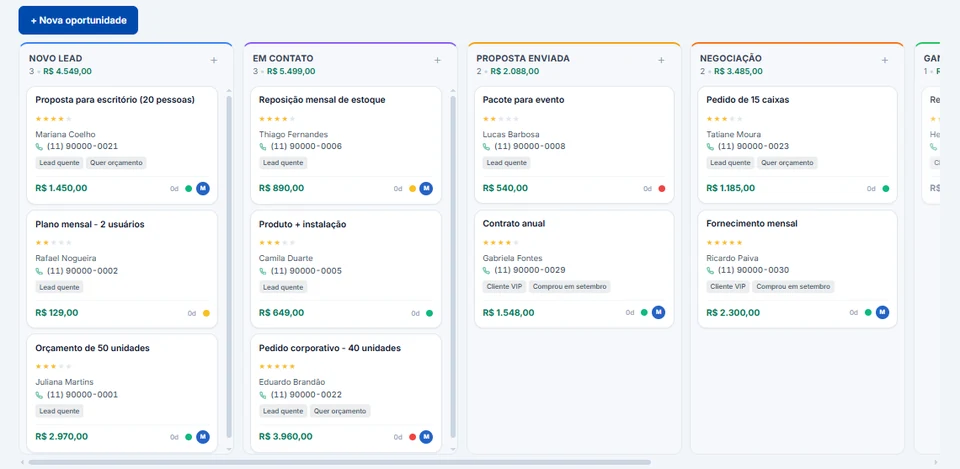
In the pipeline editor, each stage has two lines: "Meta" (Qualified lead or Disqualified lead) and "Google" (Small, Medium or Large). Each mark sits on a single stage. It is the same pipeline your team and the AI use every day, so conversions come out of work that is already being done (CRM and sales pipeline).
Disqualified leads
A disqualified-leads list for Ads Manager
Meta does not accept "bad lead" signals through the Conversions API. What you can do is keep those people out of the ad: InvestCRM builds the list of everyone sitting in a stage marked "Disqualified lead", and you download it as a CSV, with the phone number only (no name and no email), to use in Ads Manager.
- Meta forbids lists built for financial reasons (no margin, credit denied, score, income or debt). Use it only when the reason is something else, such as outside your area, wrong number or not interested.
- Meta recommends at least 1,000 people; a smaller list may not be used.
- It is manual: update it every month by downloading the list again and updating the same audience.
Plans
From the Business plan
Meta and Google conversions are on the Business and Enterprise plans.
| Feature | Grátis | Start | Business | Enterprise |
|---|---|---|---|---|
| Price per month | R$ 0 | R$ 147 | R$ 297 | R$ 597 |
| Meta and Google conversions | Not included | Not included | Included | Included |
| Sales pipelines | Not included | 1 | 5 | Unlimited |
| API and webhooks | Not included | Not included | Included | Included |
Keep reading
Other parts of InvestCRM
Start free on InvestCRM
The Free plan has no time limit and needs no card. Connect your number through the Meta window and try the system.