
Skip to content

For real estate agencies and brokers

WhatsApp for real estate agencies: from the ad lead to the viewing, with the CRECI on every message

How to set up a real estate agency's WhatsApp in InvestCRM, on Meta's official API: the click-to-WhatsApp ad lead answered at once and logged in the pipeline, the hand-off to the right broker with a response deadline, the viewing confirmed with a utility template and new-listing alerts sent only to people who asked. Plus what Brazil's real estate council (COFECI), Law 6,530 and Law 4,591 also require of the message.

The problem

The lead arrives in the middle of the night, and every broker wants it on their own phone

At an agency, the lead almost always comes from an ad or a listings portal and writes outside office hours, to the first number they see. Whoever answers first usually books the viewing. Meanwhile each broker wants the contact for themselves, and a customer who hears from three brokers at the same agency trusts none of them.

  • Ad running, WhatsApp closed: the click-to-WhatsApp ad runs at night and at weekends, and the team only opens the chats on Monday morning.
  • Hand-out through the brokers' group chat: someone forwards the contact in the group, nobody records who took it, and the conversation moves from the agency's number to the broker's personal phone.
  • Viewing agreed by voice note: the day, time and address sit in an audio message, nobody confirms the day before and the customer does not show up.
  • The message is an ad too: offering a property on WhatsApp is advertising, and an ad carries the CRECI registration number; if the property is in a plot development or a condominium, also the registration or development number at the land registry office.

The setups below follow the order of the conversation: the first reply, the hand-off to the broker, the viewing and the new-listing alert.

Setups in InvestCRM

Four setups, from the ad to the viewing

Names in bold are the on-screen labels (in Portuguese). The first, third and fourth work on Start; the hand-off with a queue and deadline is a Business feature. The pipeline behind all of it is covered in WhatsApp CRM.

From the Start plan

1. Ad lead answered at once and logged in the pipeline

Starts when

Someone taps the click-to-WhatsApp ad and writes (trigger O contato vem de um anúncio e escreve).

How to set it up

  1. Start with an Enviar Mensagem block with two buttons, "I want to buy" and "I want to rent", each connected to its own path.
  2. On each path, a Coleta de Dados step asks for the neighbourhood or area and saves the answer under Salvar Resposta em um Campo Personalizado (Field 1, for example); another asks how many bedrooms, with Tipo de Resposta set to Number, and saves it to Field 2.
  3. An Ações block applies the "Buy" or "Rent" tag with Adicionar Tag and creates the deal in the New lead stage with Adicionar ao funil.
  4. Then the Atendimento com IA block, with an agent on the SDR profile, answers questions from the knowledge base: a file (PDF, DOCX, TXT), pasted text or a website page with the listings, the rental paperwork and how viewings work.

What happens next

By 11 p.m. the lead has been answered, sits in the pipeline with neighbourhood and bedrooms recorded and is split between buying and renting. InvestCRM's fixed rules tell the AI not to make up prices, deadlines, addresses or terms that are not in the instructions or the knowledge base, and to say it will check with the team when it does not know; that is an instruction to the model, not a hard lock. If listings change every week, write in the Regras that only a broker confirms whether a property is still available.
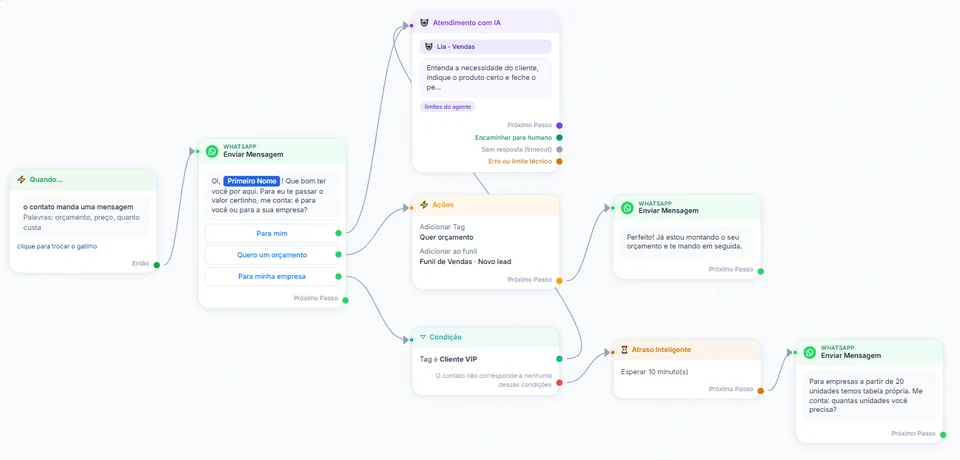
InvestCRM screen: a sample automation flow with the message trigger, a send block with three buttons, the AI customer service block and its exits, an actions block that adds a tag and creates the pipeline deal, a tag condition and a smart delay
Real InvestCRM screen, with sample data.

From the Business plan

2. Lead handed to the listing's broker, with a deadline to reply

Starts when

The lead asked for a viewing, wrote "corretor" (broker) or the AI could not answer, and the conversation left through the Encaminhar para humano exit of the AI block.

How to set it up

  1. In the SDR agent, under Palavras que passam para um humano, add "corretor" (broker) and "visita" (viewing) to the ones already there (atendente, humano, pessoa), and write in the Regras that a viewing request goes to a broker. The words are matched against what the customer types, in Portuguese, from the contact's second message on; the first goes through the model, which follows the Regras.
  2. With the brokers already under Membros da equipe, open Settings → Atendimento humano, click Ligar o atendimento humano and set up two departments, "Sales" and "Rentals", each with its own listings team in Quem atende neste setor.
  3. Duty hours go in Horários de atendimento, and the time the agency gives itself to reply in Responder em até (minutos). Anyone who writes outside duty hours gets the Fora do horário de atendimento text, and the clock only starts at the next working hour.
  4. Draw the routing in the flow: out of the Encaminhar para humano exit comes a Condição (Tag é "Buy"). Sim leads to Ações → Encaminhar para atendimento humano, with the Sales department under "1. Quem vai atender?"; Não leads to a second Condição (Tag é "Rent"), whose Sim sends to Rentals. Anyone with neither tag leaves through the last Não and goes to Fila geral — qualquer pessoa da equipe pega.
  5. Turn on Pausar a IA quando um atendente responder (inclusive pelo celular), which starts switched off, so the AI does not talk over the broker.

What happens next

The conversation drops into the department's Fila de atendimento with the reason and the waiting time, and the listing's broker clicks Assumir. They reply from the Inbox, on the agency's number: when a broker leaves the business, the lead and the history stay. The queue also flags anyone past the deadline.

From the Start plan

3. Viewing reminder the day before, for many customers at once

Starts when

The day before, whoever runs the diary applies the "Viewing tomorrow" tag to the next day's visitors on the Contatos screen (trigger Tag atribuída ao contato).

How to set it up

  1. Approval first: the visita_imovel_amanha reminder goes in the Utility category and has only First Name as a variable ({{1}}); address and time are left for the conversation with the broker.
  2. The automation has three parts: the Tag atribuída ao contato trigger listening for "Viewing tomorrow", the Modelo aprovado block with the reminder and, at the end, Ações → Remover Tag "Viewing tomorrow", which frees the tag for the same customer's next viewing.
  3. Late in the afternoon, whoever keeps the diary ticks all of the next day's visitors on the Contatos screen and applies the tag in a single go. The tag can also be added from the Inbox, but there it does not set off the automation.
  4. For a single customer whose 24-hour window has already closed, the same reminder goes out by hand from the Inbox; in that send every variable becomes the contact's name, which is why the template has no {{2}}.

What happens next

The reminder goes out even if the customer has not written for days, because it is an approved template. Replies to the "Confirmed" and "I need to reschedule" buttons land in the Inbox and, since they open the 24-hour window, the broker confirms address and time in free text.

From the Start plan

4. New listings only for people who asked for that profile

Starts when

A property that matches what someone was looking for, and asked to be told about, has come onto the books.

How to set it up

  1. In the first conversation, ask whether the person wants alerts for similar properties. Those who say yes get a profile tag, such as "Alert: 2 bed south side", and the profile written in Field 4.
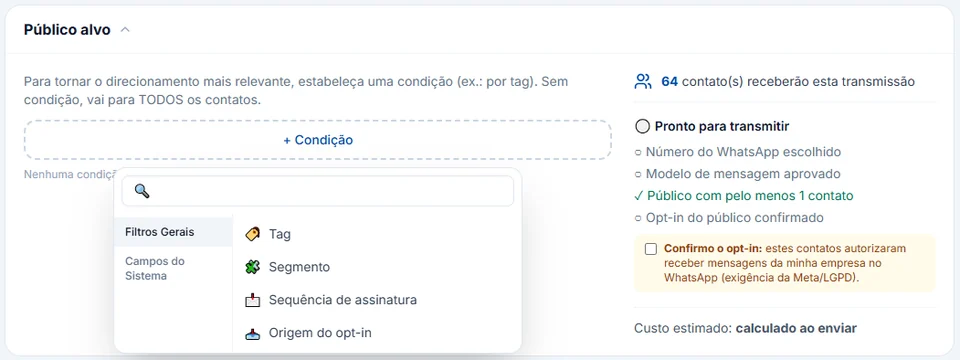
  2. Under Broadcasts, pick the imovel_novo_no_perfil template (Marketing category) and, in Público alvo, set the Tag condition to that tag; with + Excluir público, leave out the tag of people who already closed a deal.
  3. On the template's "Show me" button, click conectar › and connect the next steps: a message with the photos, the address and, if the property is in a plot development or a condominium, the registration or development number at the registry office; then an Ações block with Adicionar ao funil in the Viewing to book stage.
  4. Tick Confirmo o opt-in and schedule the date and time.

What happens next

Only people who asked for that profile receive it. Whoever taps "Show me" opens the conversation, gets the photos and joins the pipeline; the broadcast report shows sent, delivered, read and clicked. Anyone who types STOP is left out of future alerts.

InvestCRM screen: the audience block of a broadcast, with the condition menu open (tag, segment, subscription sequence and opt-in source), the note that without a condition it goes to every contact, the count of recipients and the box to confirm opt-in
Real InvestCRM screen, with sample data.

Message templates

Four templates for the agency's routine

Outside the 24-hour window, the agency can only message first with an approved template. The category sets the price, and a template offering a property counts as an ad for COFECI. Replace whatever is in square brackets before submitting it. The property code, the adjustment date and the profile sought come from contact fields: through the flow's Coleta de Dados step, a spreadsheet import (which updates existing contacts) or, on Business, the API.

  • Viewing tomorrow

    Utility

    Template name: visita_imovel_amanha

    Hello {{1}}. Tomorrow is the day of your property viewing with [Agency]. Can't make it? Just reply here and the broker will arrange another time with you.

    • Confirmed
    • I need to reschedule

    Why this category

    It reminds the customer of an appointment they made and mentions no other property: utility. If the text gains a "while you're there, see the flat next door too", it becomes marketing. The only variable is the name so the same template can also be sent by hand from the Inbox.

  • Rental application waiting for documents

    Utility

    Template name: ficha_locacao_pendente

    Hello {{1}}. The rental application for property {{2}} is waiting for documents. Please send them through [the agency's system link]; for your security, do not send personal documents in this chat.

    Why this category

    It is a notice about a process the customer started, with no property on offer: utility. The personal document goes to the agency's system because WhatsApp policy asks businesses not to request full identity document numbers in the chat.

  • New listing in the requested profile

    Marketing

    Template name: imovel_novo_no_perfil

    Hello {{1}}! A property matching the profile you asked for has come onto our books: {{2}}. Would you like to see the photos? [Agency] · CRECI-[State] J-[number]. To stop receiving property alerts, reply STOP.

    • Show me

    Why this category

    Presenting a property is an ad, and an ad is marketing for Meta, even to someone who asked for it. Under COFECI Resolution 458/1995, every ad carries the CRECI number, with the letter J for a company; a property in a plot development or a condominium also carries, prominently, the registration or development number at the registry office.

  • Rent adjustment

    Utility

    Template name: reajuste_aluguel_contrato

    Hello {{1}}. The rent for property {{2}} will be adjusted from {{3}}, according to the index in your contract. The statement was sent to your email; if you have questions, reply here.

    Why this category

    A notice about a contract term the tenant already signed, with no invitation to anything else: utility, like the account alerts in Meta's own examples.

What it costs

A month of an agency's messages, on Meta's rate card

Example of an agency with one number. Someone who arrives through a click-to-WhatsApp ad, writing from the phone app, and gets a reply within 24 hours opens Meta's free entry point window: while it lasts, nothing the agency sends that person is billed, in any category, so it is left out of this bill. The lines below are the rest: viewing reminders, rental applications and rent adjustments as utility, new-listing alerts as marketing, and conversations with the 24-hour window open as service, with tenants, with people who came from a portal, a board or a referral, and with ad leads after the free window closed. The details of that window are in click-to-WhatsApp ads.

Sample bill using Meta's official rate card, Brazilian number
What forCategoryMessages a monthBilledPrice per messageCost for the month
Viewings, rental applications and adjustments outside the ad's free windowUtility650650R$ 0.0350R$ 22.75
New-listing alerts for people who asked for the profileMarketing380380R$ 0.3217R$ 122.25
Tenants, portal and board leads, and ad leads after the free windowService (support)3,2002,200R$ 0.0350R$ 77.00
Estimated monthly total, paid straight to MetaR$ 222.00

The first 1,000 service messages of each number, every month, are free.

If the utility templates in this bill were classified as marketing, the same month would go from R$ 222.00 to R$ 408.35.

New-listing alerts weigh the most per message, which is why they should only go to people who asked for that profile: besides costing less, that keeps blocks and reports against the number low. For your own agency's volumes, use the calculator.

The volumes are an example to show the math, not data from a customer.

Meta's BRL rate card for Brazilian numbers, effective Oct 1, 2026, checked on Oct 9, 2026. See the rate card at Meta

Run your own numbers in the calculator →

Industry rules

What COFECI, the property laws and Meta require

A summary of the Brazilian rules that apply to a real estate agency's messages, with a link to the official text. InvestCRM delivers and organises the messages; the advert and the brokerage remain the broker's and the agency's responsibility.

  • CRECI on every ad, and only with written authorisation

    COFECI Resolution 458/1995, as worded by Resolution 1,404/2018, says only a broker, individual or company, holding a written brokerage agreement may advertise publicly (art. 1); that ads and printed material carry the registration number preceded by the acronym CRECI, with the letter J for a company (art. 2); and that ads for plots or units in a condominium feature the registration or development number at the land registry office (art. 3).

    In InvestCRM

    An ad without the CRECI is an offence by the broker and the agency (Law 6,530/1978, art. 20, IV), and Meta approving the template does not change that: Meta looks at the category and its messaging policy, not at council registration. InvestCRM sends the text as it is. Put the CRECI and the letter J in the marketing template itself and in the Descrição da Empresa field of the WhatsApp business profile, under Settings; the owner's written authorisation stays in your own files, outside the system.

    Source: COFECI Resolution 458/1995

  • Authorisation, registration and confidentiality in the broker's law

    Law 6,530/1978 forbids brokers and agencies to advertise a deal without written authorisation (art. 20, III), to advertise without the registration number (art. 20, IV), to advertise a plot or condominium unit without the land registry number (art. 20, V) and to breach professional confidentiality (art. 20, VI).

    In InvestCRM

    The conversation with the customer stays on the agency's number and account, with access levels per person and internal notes the customer never sees. A file received only opens through a signed link that expires within 60 to 90 minutes.

    Source: Law 6,530/1978

  • Off-plan developments: registration and registry office in the ad

    For property developments, the registration number of the development filing and the name of the registry office must appear in ads, printed material, publications, proposals and contracts, except for classified ads (Law 4,591/1964, art. 32, § 3). The developer may only sell fractions of the land after that registration (art. 32).

    In InvestCRM

    Each development needs its own marketing template, with the registration and registry office in the text, approved before the broadcast. The template header accepts an image, a video or a document.

    Source: Law 4,591/1964

  • Images and prices that do not mislead

    The Consumer Protection Code forbids misleading advertising, including by leaving out essential information about the product (art. 37, §§ 1 and 3). In practice that means saying when an image is an artist's impression or the furniture in the photo does not come with the property, and putting the conditions next to any "from" price.

    In InvestCRM

    The template text and image are yours. If the header photo is an illustration, say so in the template text: InvestCRM does not add a notice on its own.

    Source: Consumer Protection Code (Law 8,078/1990)

  • Portal and ad leads: opt-in, opt-out and no passing on conversations

    A phone number passed on by a portal does not always come with the opt-in the WhatsApp Business Messaging Policy requires: it only lets a business message people who gave it their number and agreed to hear from it on WhatsApp. The same policy requires honouring every request to stop and forbids taking what one customer said in a conversation to another customer, such as a tenant's income to someone competing for the same property.

    In InvestCRM

    The ad lead wrote first, so the conversation is open. For new-listing alerts, ask for the "yes" during the first conversation and record it in a profile tag, which becomes the broadcast audience. Anyone who types just SAIR, PARAR, STOP, CANCELAR or DESCADASTRAR goes onto the block list and gets no more broadcasts or automations.

    Source: WhatsApp Business Messaging Policy

  • LGPD: a legal basis and the right to have data erased

    Brazil's data protection law (LGPD) only allows processing personal data on a legal basis, such as consent or steps prior to a contract at the data subject's request (art. 7, I and V), and gives data subjects, among other rights, erasure of data processed on consent and withdrawal of consent (art. 18, VI and IX).

    In InvestCRM

    Someone who asks to leave the base is deleted on the Contatos screen, and their conversations go with them. The rental application, with income and documents, stays in the agency's own system rather than in the chat. InvestCRM has no LGPD seal; what it does with the account's data is in the privacy policy.

    Source: Brazilian Data Protection Law (Law 13,709/2018)

Rules checked against the official sources on Oct 18, 2026. This is not legal advice: when in doubt, ask your professional council.

Plan

Which plan the agency needs

For an agency with a team, the plan is Business. That is where the department queue (sales and rentals) with a response deadline starts, along with Meta and Google conversions: the pipeline stage marked as Qualified lead tells Meta through the Conversions API, using the ad click from up to 7 days earlier. It fits you plus 3 people, 5 pipelines (sales, rentals and new instructions, for example) and up to 10 active automations.

An independent broker starts on Start: answering ad leads with 1 AI agent, viewing confirmations and the entry flow (2 active automations), 1,000 broadcast messages a month for new-listing alerts and 1 pipeline. For more than 4 people on one account, Enterprise takes you plus 15.

Each account has one WhatsApp number. If every branch needs its own number, they are separate accounts, each with its own subscription.

InvestCRM plans: price, limits and features of each one
FeatureGrátisStartBusinessEnterprise
Price per monthR$ 0R$ 147R$ 297R$ 597
Yearly (35% off)R$ 0R$ 1,146.60 a year (same as R$ 95.55 a month)R$ 2,316.60 a year (same as R$ 193.05 a month)R$ 4,656.60 a year (same as R$ 388.05 a month)
People on the accountJust youYou plus 1You plus 3You plus 15
Contacts included1001,0005,000Unlimited
Sales pipelinesNot included15Unlimited
Active automationsNot included21050
Broadcast messages per monthNot included1,000UnlimitedUnlimited
Human handoff with queues and departmentsNot includedNot includedIncludedIncluded
Meta and Google conversionsNot includedNot includedIncludedIncluded

See all plans and pricing →

Questions

Questions from whoever runs the agency's WhatsApp

Can the AI book the viewing in the broker's diary?

Not by itself. With the Calendário skill on, it understands when the lead says "tomorrow" or "Friday", but it cannot see anyone's diary. To actually hold a slot, the agent has to talk to the agency's booking system through the "Consultar sistema externo (API)" skill. Without that, the AI notes the day and time of day the lead prefers, and the broker who takes over the conversation settles the time and address.

Do leads from listings portals come into InvestCRM automatically?

There is no ready-made portal integration. A lead comes in when they write to the number (through the ad, the link or the QR code on the board), when you import a spreadsheet (CSV or XLSX) or through the InvestCRM API, which is on the Business plan.

Can brokers answer from their own phones?

On the agency's number, yes: each broker signs in to InvestCRM in the browser with their own login and replies from the Inbox. With Coexistence, the same number also stays in the WhatsApp Business app. What does not work is each broker taking the conversation to their own number, because then the history leaves the business.

Do I need a new template for every property?

No, as long as the template text is generic and the profile comes in a variable, as in imovel_novo_no_perfil: photos and address follow the tap, once the conversation is open. A property in a plot development or a condominium must show in the ad, prominently, the registration number of the plots or of the development at the registry office (COFECI Resolution 458/1995, art. 3; Law 6,530/1978, art. 20, V): that number goes in the photos message and, if the template already names the development, in the template text itself, which means one template per development.

How do I know which ads bring good leads?

With Meta and Google conversions, on Business: a card that reaches the Qualified lead stage becomes an event for Meta, and a signed contract can become an offline conversion in Google Ads. The Disqualified lead stage sends nothing and makes the system stop telling Meta about that contact.

Keep reading

To set up your agency in InvestCRM

Start free on InvestCRM

The Free plan has no time limit and needs no card. Connect your number through the Meta window and try the system.