
Skip to content

For course creators and online schools

WhatsApp for online courses and info products: purchase, access and student support

How to use InvestCRM, on Meta's official API, across the course seller's cycle: the payment platform's event turned into a message through the API, the access notice sent as utility, the abandoned checkout reminder sent as marketing, AI answering students from the course material, and refund requests within the 7-day window. There is no ready-made checkout integration, and this page says what you can and cannot do without one.

The problem

Why a course seller's WhatsApp turns into a mess

In an online course business, one number hears from people at three stages: those still deciding, those who just paid and cannot find their login, and students stuck on a lesson. Each needs a different message, in a different Meta category, and so at a different price per delivery.

  • The sale happens outside WhatsApp: the approved purchase, the Pix code and the abandoned checkout are recorded on the payment platform. To become a message, someone has to carry that event to WhatsApp, and InvestCRM has no ready-made integration with Hotmart, Kiwify or any other platform.
  • The access email comes with a pitch attached: welcome emails often end with "check out our next course too". On WhatsApp, Meta treats a mixed-content template as marketing, so the notice is billed at the marketing price.
  • Student questions arrive after hours: "is the class recorded?", "where do I download the material?" and "how do I change my login email?" come in at night and on weekends, and the answers are already written in the creator's own material.
  • Refunds are conversations too: in Brazil an online purchase counts as a contract made outside the store, and the Consumer Protection Code gives 7 days to back out. The request often comes in over WhatsApp and needs both a reply and a record.

The setups below use what InvestCRM does today. Where the event comes from the payment platform, the route is the InvestCRM API, which starts on the Business plan and needs someone technical to connect both ends.

Setups in InvestCRM

Four setups for the student's journey

Bold text is the exact label of each button and field in the dashboard (in Portuguese). The first two depend on the purchase event and therefore on the API; the last two work on their own from the Start plan.

From the Business plan

1. An approved purchase becomes an access notice, through the API

Starts when

The payment platform reports an approved purchase, and a small program in between calls the InvestCRM API.

How to set it up

  1. In Settings → Integrações (API), click + Nova chave (new key) and store it: it goes in the header of every call, as Authorization: Bearer or as x-api-key.
  2. Ask whoever handles your tech to build a small program that receives your payment platform's notification and calls POST /api/v1/contacts with the phone, the name, the course name in var1 (Campo 1) and the tag "Comprou". Each key accepts up to 60 calls a minute. There is no ready-made connector: without that program in the middle, the event never arrives.
  3. In Automations, create a flow with the Tag atribuída ao contato trigger (tag added to contact) and the tag "Comprou". Connect a Modelo aprovado block (approved template) with the acesso_liberado template, in the Utility category, mapping {{1}} = Primeiro Nome and {{2}} = Campo 1.
  4. In the same flow, add an Ações block with Remover da sequência, so buyers leave the reminder sequence from the next setup.

What happens next

The contact arrives with the tag and the flow fires immediately, even with no open chat, because the first send is an approved template. The exception is someone whose chat is in the queue or with an agent: then the access notice stays on hold until they write again, so close the conversation with anyone who was asking questions before paying. One API detail: it fires the Novo contato criado and Tag atribuída ao contato triggers, but not O valor no campo do contato foi alterado (field changed). That is why this setup relies on the tag rather than on the field alone.
From the Business plan

2. A reminder for people who started signing up and never paid

Starts when

The same program receives the abandoned checkout notice from the platform and calls POST /api/v1/sequences/:id/subscribe with the phone.

How to set it up

  1. In Automations → Sequências, create a sequence called "Unfinished sign-up" with + Mensagem: the first one Após 2 hora(s) (after 2 hours), the second Após 1 dia(s). Each message is an approved template, and both reminders are marketing.
  2. Mind the variables: in a sequence, every variable is filled with the contact's name. Use templates with a single variable, {{1}} for the name, and write the course name into the template text itself.
  3. Before subscribing anyone, the program must have created the contact through /api/v1/contacts (the API refuses to subscribe a phone that is not in the account). And it should do both only for people who ticked, at checkout, the box to receive WhatsApp messages: the API stamps API as the source and an opt-in date on every contact it creates, without checking that consent.
  4. Publish the sequence. When the purchase is approved, the previous setup removes the person with Remover da sequência.

What happens next

People who pay stop getting reminders, and anyone who types SAIR leaves the sequence before the next step, counted under Parados (opt-out). If a team member is handling the chat, the step waits until that conversation is done. The reminder is billed as marketing: the cost section shows how much it weighs in a month.

From the Start plan

3. An AI agent that answers students from the course material

Starts when

A student writes at any hour, for example with "access", "class" or "material" (trigger O contato envia uma mensagem, contact sends a message).

How to set it up

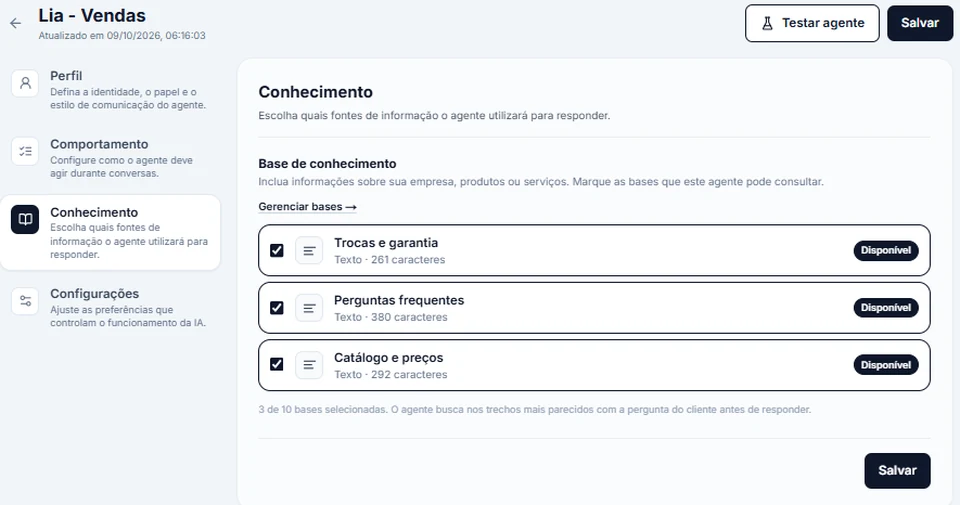
  1. In Agente de IA, create the agent and, on the Conhecimento tab (knowledge), tick the bases: the course FAQ, the refund policy and the members area walkthrough. Each base takes text, a PDF, DOCX, TXT, MD or CSV file of up to 15 MB, or a web page, with up to 300,000 characters.
  2. On the Behavior tab, write down what the agent never does: it does not promise results, does not change login emails and does not approve refunds. Those requests go to the team.
  3. In the flow, connect the trigger to the Atendimento com IA block with that agent, and add your OpenAI or Anthropic key in Settings → Agente de IA.
  4. Before opening it to students, run Testar agente (test agent) with the ten questions you get most.

What happens next

The agent looks up the answer in the ticked bases before writing and calls the team when the topic goes beyond the material. AI usage is paid on your own OpenAI or Anthropic key, with a daily call limit. Replies inside an open chat are service messages: Meta does not charge the first 1,000 of them each month, per number.

InvestCRM screen: Conhecimento tab of a sample AI agent, with three text bases ticked for lookup (Trocas e garantia, Perguntas frequentes, Catálogo e preços) and the Testar agente button at the top
Real InvestCRM screen, with sample data.

From the Start plan

4. A nudge for leads who asked about the course and went quiet

Starts when

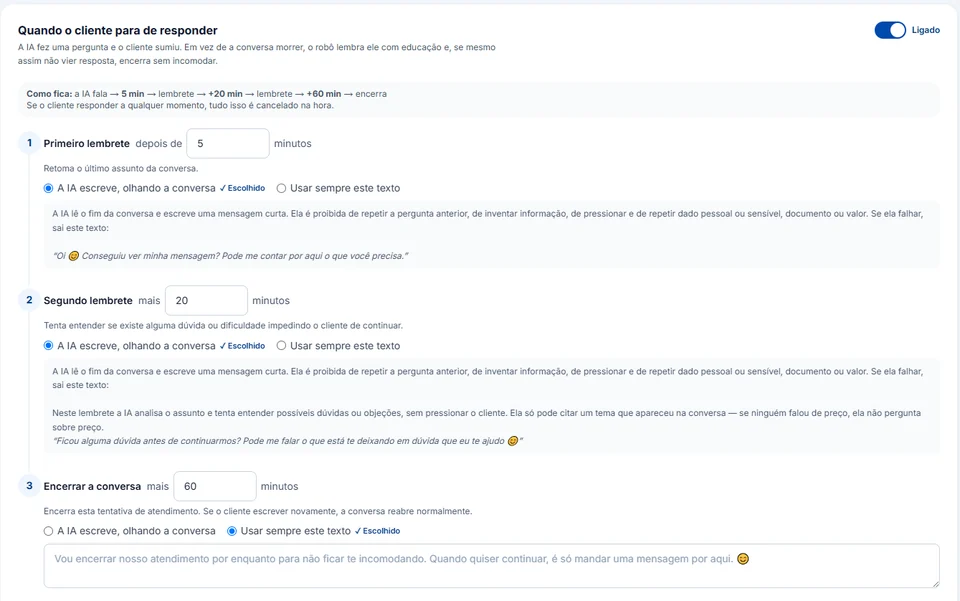
The AI asked the lead a question during the chat and got no answer (option Quando o cliente para de responder, when the customer stops replying).

How to set it up

  1. In Settings → Agente de IA, switch on Quando o cliente para de responder and set the minutes for Primeiro lembrete, Segundo lembrete and Encerrar a conversa (first reminder, second reminder, close the chat).
  2. For each step, choose whether the AI writes from the conversation or always sends the same text.
  3. Keep the closing message fixed and low-pressure: the person can come back whenever they like.

What happens next

These reminders are free-form text: they only go out while the 24-hour window is open and are billed as service, not marketing. If the lead replies, whatever is left is cancelled. Once the window has closed, the only way to reach out again is an approved template, such as the next-cohort invitation further down.

InvestCRM screen: the Quando o cliente para de responder option switched on, with a first reminder after 5 minutes, a second one 20 minutes later, both written by the AI from the conversation, and a fixed closing message 60 minutes after that
Real InvestCRM screen, with sample data.

Message templates

Templates for an online school, in the right category

Access notices, payment reminders and cohort invitations go out days after the chat, so each one needs Meta's approval first. On the template creation screen, the category is picked from Marketing, Utility and Authentication; the brackets are for your course name and dates.

  • Access granted

    Utility

    Template name: acesso_liberado

    Hi {{1}}, your purchase of {{2}} was approved and your login details went to your sign-up email. If you cannot find that email, reply here and the team will help.

    • I did not get access

    Why this category

    It is about a purchase the person made and pitches nothing: that is order management, which Meta files under utility. Add "check out our advanced course too" at the end and it becomes mixed content, which moves it to marketing.

  • Sign-up not completed

    Marketing

    Template name: inscricao_nao_concluida

    Hi {{1}}, it looks like your sign-up for [course name] was not completed. The payment link is still in your email, and the team can answer any question right here. To stop getting messages from this number, reply STOP.

    • I have a question
    • I already paid

    Why this category

    It reads like a notice, but Meta lists cart reminders among its retargeting examples, which are marketing even when the person started the purchase. Sent as utility, it would be recategorized. That is why it includes a way out and only the name variable, as the sequence requires.

  • Refund request received

    Utility

    Template name: reembolso_recebido

    Hi {{1}}, we received your refund request for {{2}}. The amount goes back through the same payment method, and we will let you know here once the refund is made.

    Why this category

    It confirms a student request about their own purchase, with no attempt to talk them out of it: order management, and Meta uses a processed refund as a utility example. It also works as the immediate confirmation that Brazil's Decree 7,962/2013 requires.

  • Invitation to the next cohort

    Marketing

    Template name: convite_proxima_turma

    Hi {{1}}! Enrollment for the new [course name] cohort opens on [date]. Would you like the link on opening day? To stop getting messages from this number, reply STOP.

    • Send me the link

    Why this category

    Inviting someone to a new purchase is marketing, even if they are already a student. The text says when enrollment opens, promises no results or income and explains how to opt out. Tapping the button opens the chat, and the link is sent afterwards as a regular reply.

What it costs

A month of messages for an online school, at Meta's rates

An example school with one number: purchase-related notices as utility, reminders and invitations as marketing, and support inside the 24-hour window as service. Meta bills the messages to the payment method you set up in Business Manager; InvestCRM adds nothing per message.

Sample bill using Meta's official rate card, Brazilian number
What forCategoryMessages a monthBilledPrice per messageCost for the month
Access notices and refund confirmationsUtility600600R$ 0.0350R$ 21.00
Unfinished sign-up reminders and next-cohort invitationsMarketing1,5001,500R$ 0.3217R$ 482.55
AI and team replies to student questionsService (support)2,5001,500R$ 0.0350R$ 52.50
Estimated monthly total, paid straight to MetaR$ 556.05

The first 1,000 service messages of each number, every month, are free.

If the utility templates in this bill were classified as marketing, the same month would go from R$ 556.05 to R$ 728.07.

Notice where the money goes: each unfinished sign-up reminder costs more than nine times an access notice, because it is marketing. Before switching the sequence on for every abandoned checkout, work out how many payments it has to win back to cover itself.

The volumes are an example to show the math, not data from a customer.

Meta's BRL rate card for Brazilian numbers, effective Oct 1, 2026, checked on Oct 9, 2026. See the rate card at Meta

Run your own numbers in the calculator →

Industry rules

What the Consumer Code, the LGPD and Meta require, and what the system does

Selling courses online in Brazil means answering to the Consumer Protection Code, the e-commerce decree, the LGPD and Meta's policy. Each card links the official text; what is sold and promised stays with the seller, while InvestCRM handles delivering and organizing the messages.

  • Seven days to cancel an online purchase

    Article 49 of the Brazilian Consumer Protection Code gives consumers 7 days to withdraw when the contract is made outside the business premises, counted from signing or from receiving the product or service. If they withdraw, whatever they paid is returned at once, adjusted for inflation (sole paragraph).

    In InvestCRM

    InvestCRM does not process refunds or talk to the payment platform. A request that arrives over WhatsApp stays in the inbox with its history, and the AI agent's rules can route every refund request to a person instead of answering it alone.

    Source: Consumer Protection Code (Law 8,078/1990)

  • Withdrawal through the same channel as the purchase

    Decree 7,962/2013, on e-commerce, requires clear information on how to withdraw (art. 5), lets consumers withdraw through the same tool used to sign up (§ 1) and requires the seller to confirm receipt of the request immediately (§ 4).

    In InvestCRM

    If the sale was closed in a WhatsApp chat, the withdrawal request may come through it too. The reembolso_recebido template above is that confirmation; your team decides when to send it, because InvestCRM cannot tell on its own that the request has arrived.

    Source: Decree 7,962/2013 (e-commerce)

  • Multi-level marketing and deceptive offers are out

    The WhatsApp Business Messaging Policy lists goods and services that cannot be offered on the platform, including multi-level marketing and business models Meta finds to be fraudulent or deceptive. The same policy recommends separate opt-ins per message category and clear instructions for leaving each one.

    In InvestCRM

    InvestCRM does not review what you sell. Before every broadcast it asks for the "Confirmo o opt-in" box, and anyone who types just SAIR, PARAR, STOP, CANCELAR or DESCADASTRAR goes on the number's block list.

    Source: WhatsApp Business Messaging Policy

  • Access and billing are utility; checkout nudges and discounted renewals are marketing

    Under Meta's category rules, utility cannot carry promotional intent and must concern something of the user's, such as their order or account. Cart reminders and invitations to renew a subscription at a discount appear among the marketing examples, as retargeting, even when the user asked for them. A billing reminder for a service already purchased appears as utility.

    In InvestCRM

    You pick the category when creating the template, and Meta checks it and may approve it as marketing. If you sell course subscriptions, keep the billing notice (utility) and the annual plan invitation (marketing) in two separate templates.

    Source: Meta's template categories

  • What the student's phone number may be used for

    Brazil's LGPD only allows personal data processing on the grounds in article 7, among them the data subject's consent (item I) and performing a contract they are party to, at their request (item V). Article 18 gives data subjects the right to ask for deletion of data processed with their consent and to revoke that consent.

    In InvestCRM

    A notice about the course someone bought and an invitation to another cohort may rest on different grounds; for offers, the safer path is a recorded consent. In InvestCRM, anyone who types SAIR goes on the block list, and the Ações block has Excluir contato (delete contact) for deletion requests.

    Source: General Data Protection Law (Law 13,709/2018)

Rules checked against the official sources on Oct 18, 2026. This is not legal advice: when in doubt, ask your professional council.

Plan

Which plan an online school needs

To connect the payment platform, the plan is Business: the InvestCRM API only answers accounts on that plan or above, and it is the route by which approved purchases, abandoned checkouts and refunds become tags and sequence subscriptions. Business also has no monthly cap on broadcast messages, and comes with 10 active automations, 5 AI agents and the human support queue by department.

Without connecting the platform, Start covers a small school: one AI agent answering students, the nudge for leads who went quiet, 2 active automations and 1,000 broadcast messages a month to announce a new cohort.

Every student and every lead becomes a contact and counts toward the plan's included contacts; the table shows how many each plan holds.

InvestCRM plans: price, limits and features of each one
FeatureGrátisStartBusinessEnterprise
API and webhooksNot includedNot includedIncludedIncluded
Contacts included1001,0005,000Unlimited
Active automationsNot included21050
AI agents1, test chat only15Unlimited
Broadcast messages per monthNot included1,000UnlimitedUnlimited
Human handoff with queues and departmentsNot includedNot includedIncludedIncluded

See all plans and pricing →

Questions

Questions from course sellers

Does InvestCRM integrate with Hotmart or Kiwify?

No. There is no connector for any course payment platform. The route is the InvestCRM API, from the Business plan: your own program receives the platform's notification and calls the API to create the contact, add the tag or subscribe it to a sequence. The documentation lives inside the dashboard, under Integrações (API).

Can I send the access link over WhatsApp?

Yes, in the acesso_liberado template, which accepts a link button (+ Link (URL) on the template screen), or as a reply in an open chat. Keep the text about the purchase only: an access link with a "grab this too" next to it becomes marketing.

Can the AI unlock access or change a student's email?

The agent only looks things up. With the "Consultar sistema externo (API)" skill, it calls an address of yours with the question and the student's phone and uses the answer. Changing an email or unlocking access depends on what that address does on your side; without it, the request goes to the team.

How do I tell buyers from leads in a broadcast audience?

By the tag your program applies. The API automatically stamps every contact it creates with API as the source and an opt-in date; InvestCRM does not check whether consent was given. In the broadcast's Origem do opt-in filter, those contacts show up alongside people who wrote first, as "Mandou mensagem (WhatsApp)": the origin neither splits the two groups nor proves consent, which lives in your checkout platform.

What about launching the next cohort?

The waiting list, the batched announcement calendar and the cost of a launch are covered in WhatsApp for launches.

Keep reading

To set up the school in InvestCRM

Start free on InvestCRM

The Free plan has no time limit and needs no card. Connect your number through the Meta window and try the system.